# iLoveAPI REST API reference
> Markdown version of the iLoveAPI REST API reference (OpenAPI 3.1.0, API version 1.0). HTML version: https://www.iloveapi.com/docs/api-reference · OpenAPI document: https://www.iloveapi.com/openapi/iloveapi.json
## Contents
- [Introduction](#introduction)
- [Quick Start](#quick-start)
- [Authentication](#authentication)
- [Request workflow](#request-workflow)
- [Security](#security)
- [Errors](#errors)
- [Credit consumption](#credit-consumption)
- [Webhooks](#webhooks)
- [Fonts compatibility](#fonts-compatibility)
- [Authentication endpoint](#authentication-endpoint)
- [Authentication](#authentication-1)
- [PDF & Image REST API](#pdf--image-rest-api)
- [Start](#start)
- [Upload](#upload)
- [Process](#process)
- [Download](#download)
- [Task](#task)
- [PDF tools](#pdf-tools)
- [Image tools](#image-tools)
- [Signature REST API](#signature-rest-api)
- [Signatures](#signatures)
- [Signature receivers](#signature-receivers)
- [Signature files](#signature-files)
- [Webhook subscriptions](#webhook-subscriptions)
- [Webhook subscriptions](#webhook-subscriptions-1)
- [Webhook payloads](#webhook-payloads)
- [task.completed](#taskcompleted)
- [task.fail](#taskfail)
- [signature.*](#signature)
- [Shared objects](#shared-objects)
- [Error](#error)
- [Task webhook payload](#task-webhook-payload)
- [Common process parameters](#common-process-parameters)
- [Task status types](#task-status-types)
- [File status types](#file-status-types)
- [Task information](#task-information)
- [Signature request](#signature-request)
- [Signature receiver](#signature-receiver)
## Introduction
The iLoveAPI API is organized around the [REST](https://en.wikipedia.org/wiki/Representational_State_Transfer)
standard, having a predictable resource-oriented URLs through
[HTTP methods](https://en.wikipedia.org/wiki/Hypertext_Transfer_Protocol#Request_methods) where obtain the
information in [JSON](http://www.json.org/) format.
We support [cross-origin resource sharing](https://en.wikipedia.org/wiki/Cross-origin_resource_sharing),
allowing you to interact securely with our API from a client-side. Although you should never expose your
secret API key in the client-side code.
To start developing, [register to iLoveAPI Developers](https://www.iloveapi.com/signup) and you will be provided with a free account.
This account comes with 2,500 free credits to use each month. However, if you need more, you can
acquire more credits from our [Pricing page](https://www.iloveapi.com/pricing).
| PDF & Signature Libraries | |
|---|---|
| **PHP** | [See on GitHub](https://github.com/ilovepdf/ilovepdf-php) |
| **.Net** | [See on GitHub](https://github.com/ilovepdf/ilovepdf-net) |
| **Ruby** | [See on GitHub](https://github.com/ilovepdf/ilovepdf-ruby) |
| **Node.js** | [See on GitHub](https://github.com/ilovepdf/ilovepdf-nodejs) |
| **Python** | [See on GitHub](https://github.com/ilovepdf/ilovepdf-python) |
| Image Libraries | |
|---|---|
| **PHP** | [See on GitHub](https://github.com/ilovepdf/iloveimg-php) |
| **.Net** | [See on GitHub](https://github.com/ilovepdf/iloveimg-net) |
| **Python** | [See on GitHub](https://github.com/ilovepdf/iloveimg-python) |
## Quick Start
This Reference is for developers who wish to create their own API library or for those who don't find their
preferred library in our library compatibility list. The quickest way to start using our API is to:
- [Register as a developer](https://www.iloveapi.com/signup).
- Get a Project ID and its related Secret Key from the [API Keys](https://www.iloveapi.com/user/projects) section of your console.
- Download one of our API Libraries.
- Try out our demos in the API Library.
- Lastly, remember to read this documentation!
If you have any comments or suggestions for this documentation or the API, please don’t hesitate to
[contact us](https://www.iloveapi.com/contact).
## Authentication
You can authenticate in two ways: with an **API key header** (the simplest, for server-side code) or with a
**JWT signed token**. Both work on every authenticated endpoint; if a request has an `Authorization` header,
the token is used.
### API key header
Send your project **secret key** in the `X-Api-Key` header of every request. There is no token to sign or
renew:
```bash
curl https://api.ilovepdf.com/v1/start/compress \
-H "X-Api-Key: secret_key_..."
```
Use it only from your servers, over HTTPS, and keep the key out of browsers, apps and repositories: whoever
has it can use your credits. The key is only read from the header (never from the URL or the body), and if a
request also sends an `Authorization` header, that token is used instead. It is not accepted for projects
restricted by domain (use a signed token there). For projects restricted by IP, it only works from the allowed
IPs: a good way to limit what a leaked key can do. If a key is exposed, create a new project in your console
and delete the old one.
### JWT signed token
We are using a very simple but effective Authentication method: [JWT](https://jwt.io/), **JSON Web Tokens**.
It consists of sending a Bearer Header in every request with a signed token by your Secret Key provided in
your iLoveAPI API Developer Account. Your Secret Key may never be exposed, but the signed token can be exposed
and you must send it in every header request parameter `Authorization: Bearer {signed_token}`. Take into
account that all signed tokens expire after 1 hour. All our API Libraries manage the authentication
automatically. You only need to set your Private Key and your Public Key in the API Library.
If you are developing your own library/requests, there are two methods for getting the signed token. One
method is by **self signing it** (recommended for server side code) and the other is by **requesting it to
our Authentication server** (recommended for client side code).
#### Self-signed token
You must use your secret and public key pair to generate the signed token to send in to the
`Authorization: Bearer {signed_token}` header of every request. You can find the JWT libraries directly on
the [JWT](https://jwt.io/) official website. Remember: The claims *exp*, *nbf* and *iat* must be in
**UTC timezone**.
#### Request signed token from our authentication server
When you send a request to the /auth resource, you will receive the token to use in your
`Authorization: Bearer {signed_token}` that you'll send in every request (**/start, /upload, /process,
/download**). We strongly recommend that you activate filters by domain and IP if you need to request the
token from our /auth server. This way, only the requests made from the domains you set will be accepted.
Remember that the token has an expiration date and must be requested again.
See the **Authenticate** endpoint (`POST https://api.ilovepdf.com/v1/auth`) for its parameters and response.
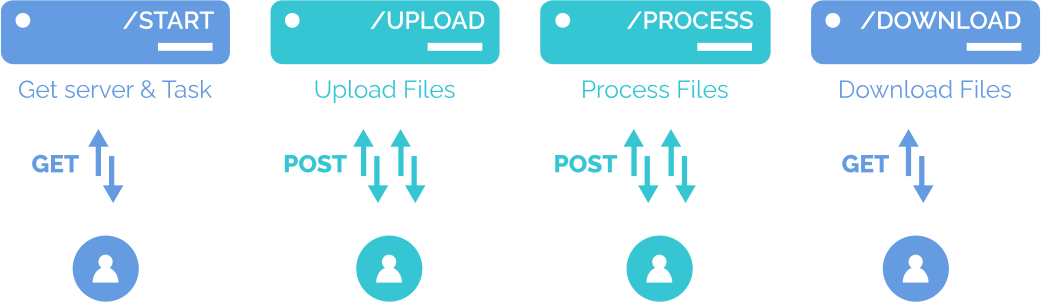
## Request workflow
The PDF and Image processing workflow with iLoveAPI is very simple and consists of 4 basic request
instructions: **Start task**, **Upload files**, **Process files** and **Download files** (see the **Start**,
**Upload**, **Process** and **Download** endpoints). Once the API has executed these four steps, your PDF and
Image files will have been processed with your desired tool and downloaded anywhere you like.
Below you will see a complete reference to these 4 requests and the parameters for each step.
## Security
As an API user, you will only have access to your tasks and files. The original and processed files are
deleted after an hour (depending on your tier, it can be more). After processing and downloading the output
files you can also remove the task and the files involved in the process.
### Rate Limiting
All endpoints are subject to API rate limiting, depending on the tier. As part of every response, the HTTP
headers will show your current rate limit status.
### Open task limitation
The number of tasks that can be opened at one time is limited to 10% of your monthly subscription’s file
limits. If you reach this limit of opened tasks, an error will be sent warning you to close tasks (by
processing or destroying them). Note that a task is opened from the moment an Upload is made until the
Process is executed, with the exception of password-protected files; in this case, the task will be closed
when the Process can be completed with a correct password.
### IP and domain filtering
Depending on the tier you have, you can configure from where your API request must be allowed. All API
requests coming from other domains or IP that are not configured will be rejected.
## Errors
iLoveAPI API uses conventional HTTP response codes to indicate the success or failure of an API request.
In general, codes in the 2xx range indicate success, codes in the 4xx range indicate an error that failed
due to the information provided (e.g. a required parameter was omitted, a process failed, etc.), and codes
in the 5xx range indicate an error with iLoveAPI's servers. All error responses have the same structure, and
you’ll find all the arguments and errors specified in the param.
For ProcessingError in the param, you'll expect an Array of failed files and the reason for failure. When
the error is a 400 Bad request we can specify which type of error we are giving (see the **Error 400 types**
table below).
The error response format is described by the `Error` schema.
### HTTP Error codes
| Attribute | Description |
|---|---|
| **type** | The type of error returned. Can be: *HTTP Error*, *UploadError*, *ProcessingError*, *DownloadError*. |
| **message**
optional | A human-readable message providing more details about the error. |
| **code**
optional | HTTP Error code. |
| **param**
optional | The parameter the error relates to if the error is parameter-specific. You can use this to display a message near the correct form field, for example. |
| HTTP Error Codes | Description |
|---|---|
| **200 - OK** | Everything worked as expected. |
| **400 - Bad Request** | The request was unacceptable, often due to missing a required parameter. |
| **401 - Unauthorized** | No valid API key provided or not correct. |
| **404 - Not found** | The requested resource doesn't exist. |
| **429 - Too many requests** | Too many requests hit the API too quickly. We recommend an exponential backoff of your requests. |
| **5xx - Server Errors** | Something went wrong on our API's end |
| Error 400 types | Description |
|---|---|
| **UploadError** | Some parameter or the file is missed in the request or something went wrong. |
| **ProcessingError** | Some parameter is missed in the request or the process was unsuccessful. |
| **DownloadError** | The file may have already been removed or has expired. |
## Credit consumption
### How does credit consumption work?
iLovePDF’s subscriptions and pre-paid packages work using credits. These credits allow you to
*process files*, use *Digital Signatures*, and add *SMS authentication* to Signature Requests.
In your monthly subscription, you can use a specific number of credits that are automatically renewed each
month.
Alternatively, or in addition to your monthly subscription, you can purchase pre-paid packages. Packages
provide you with additional credits to get the job done. Credits in your packages don’t expire, so you can
use them at any time from your account.
Credits will always be consumed from your subscription first.
### How are the credits consumed?
iLovePDF provides credits for *PDF & Image* processing, *Digital Signatures*, and *SMS authentication*.
Depending on the tool, the credits consumed vary based on number of files, number of tasks or number of
pages. Please refer to the [pricing page](https://www.iloveapi.com/pricing#credits) for detailed information.
## Webhooks
You can configure the specific URLs to which you want to receive webhooks, ensuring that each event type is
directed to the appropriate endpoint within your application from your user area. Additionally, you have the
flexibility to select which events your webhook should subscribe to, allowing you to tailor the
notifications to suit your application’s needs. This configurability ensures precise and relevant data
delivery, optimizing your system's interaction with our platform.
All of the webhooks have the same structure, a JSON with two keys: "event" and "data". The event is the
event name which is being sent, and "data" is the event related data.
Response example:
```json
{
"event": "signature.created",
"data": {
"signature": {
.....
}
}
}
```
### Task webhooks
The tasks haves two related events, **"task.completed"** and **"task.fail"**. The "data" field always
contains the "task" key, which contains information similar to the following example:
Task response example:
```json
{
"event": "task.completed",
"data": {
"task": {
"tool": "compress",
"process_start": "2024-06-17 10:18:17",
"custom_int": null,
"custom_string": null,
"status": "TaskSuccess",
"status_message": "This task has been processed successfully.",
"timer": "0.206",
"filesize": 13264,
"output_filesize": 9792,
"output_filenumber": 1,
"output_extensions": [
"pdf"
],
"server": "api70.ilovepdf.com",
"task": "xxxxxxxxxxxxxxxxxxxxxxxxx",
"file_number": "1",
"download_filename": "server.pdf"
}
}
}
```
### Signature event
All signature related events contains one mandatory key: "signature", which contains the same information
as if you used the API call of **Get signature status** (see the Signatures endpoints).
Additionally, if an event is directly related to a signer / validator / witness, it also includes an
additional key called "signed", the result of which is the same as the API call **Get receiver info** (see
the Signatures endpoints).
Signature response example:
```json
{
"event": "signature.signer.completed",
"data": {
"signature": {
"expired": false,
"lock_order": false,
"expiring": false,
"notes": null,
"brand_name": null,
"language": null,
"subject_cc": null,
"message_signer": null,
"subject_signer": null,
"token_requester": "xxxxxxxxxxxxx",
"created": "2024-06-17 12:02:59",
"completed_on": "2024-06-17 12:39:34",
"expires": "2024-10-25 13:00:00",
"status": "completed",
"name": "test",
"email": "test@isfjdijasdifjdasfadsf.com",
"uuid_visible": true,
"certified": true,
"signer_reminders": true,
"signer_reminder_days_cycle": 2,
"verify_enabled": true,
"uuid": "9B41A389-6645-45FB-A72D-3A19CC3EF9F9",
"mode": "multiple",
"files": [
{
"filename": "a.pdf",
"pages": 62,
"filesize": 2617649
}
]
},
"signer": {
"uuid": "5E4E6228-CF1E-4533-BC85-4FA660117EF5",
"name": "asdfadsfafas",
"email": "test2@8usijfas9yudsfsdf.com",
"phone": null,
"phone_retries_left": 1,
"type": "signer",
"token_requester": "xxxxxxxxxxxxxxxxxxx",
"status": "signed",
"access_code": false,
"force_signature_type": "all",
"notes": null,
"fix_email_needed": false,
"fix_phone_needed": false
}
}
}
```
## Fonts compatibility
For tools such as Add Page Numbers and Add Watermark, which allow you to set a font family for its content,
there is a list of compatible fonts to use with any alphabet. Take into account that if you use a font which
isn’t on this list, it could cause spelling issues.
| Alphabet | Font | Styles |
|---|---|---|
| Latin, Cirillic and Greek alphabets | **Arial** | Regular, Bold, Italic, Bold Italic |
| Latin, Cirillic and Greek alphabets | **Courier** | Regular, Bold, Italic, Bold Italic |
| Latin, Cirillic and Greek alphabets | **Times New Roman** | Regular, Bold, Italic, Bold Italic |
| Latin, Cirillic and Greek alphabets | **Verdana** | Regular, Bold, Italic, Bold Italic |
| Latin, Cirillic and Greek alphabets | **Comic Sans MS** | Regular, Bold |
| Arabic alphabet | **Arial** | Regular |
| Arabic alphabet | **Courier** | Regular |
| Arabic alphabet | **Times New Roman** | Regular |
| Chinese, Japanese and Korean alphabets | **WenQuanYi Zen Hei** | Regular |
| Chinese, Japanese and Korean alphabets | **Arial Unicode MS** | Regular |
| Hindi alphabets | **Lohit Marathi** | Regular |
| Hindi alphabets | **Lohit Devanagari** | Regular |
## Authentication endpoint
### Authentication
Obtain the JWT signed token sent as `Authorization: Bearer {signed_token}` in every request. The token can be
self-signed with your project secret key (recommended for server side code) or requested to the
authentication server (recommended for client side code). See the **Authentication** section.
Server-side code can also send the project secret key in the `X-Api-Key` header instead of a token.
#### Authenticate
`POST https://api.ilovepdf.com/v1/auth`
No authentication required.
Request signed token from our authentication server.
When you send a request to the /auth resource, you will receive the token to use in your
`Authorization: Bearer {signed_token}` that you'll send in every request (**/start, /upload, /process,
/download**). We strongly recommend that you activate filters by domain and IP if you need to request the
token from our /auth server. This way, only the requests made from the domains you set will be accepted.
Remember that the token has an expiration date and must be requested again.
Take into account that all signed tokens expire after 1 hour.
**Request body** (`application/json`)
- **`public_key`** (string, required)
Project public key that you can find in [admin panel](https://www.iloveapi.com/user/projects).
**Responses**
- `200`: Signed token.
```json
{
"token": "eyJ0eXAiOiJKV1Q..."
}
```
## PDF & Image REST API
### Start
Retrieve the information about which server will be your assigned server and which Task ID to use.
The request must contain the tool you want to access.
#### Get Server & Task ID
`GET https://api.ilovepdf.com/v1/start/{tool}`
Authentication: `Authorization: Bearer {token}`.
Retrieve the information about which server will be your assigned server and which Task ID to use. The
request must contain the tool you want to access.
Endpoint: `https://api.ilovepdf.com/v1/start/{tool}/{region}`. The `region` segment is optional
(accepted values: `null` (default), `eu`, `us`, `fr`, `de`, `pl`, `in`, `sg`); this operation is the form
without region, see **Get Server & Task ID in a region** for the form with it.
**Parameters**
- **`tool`** (string, path parameter, required)
The tool you want to access.
PDF tools: `compress`, `extract`, `htmlpdf`, `imagepdf`, `merge`, `officepdf`, `organize`, `pagenumber`,
`pdfa`, `pdfjpg`, `pdfocr`, `protect`, `repair`, `rotate`, `split`, `unlock`, `validatepdfa`, `editpdf`,
`watermark`.
AI PDF tools: `splitsmart`, `summarize`, `translate`, `pdfmarkdown`, `formsdetect`.
Image tools: `blurfaceimage`, `compressimage`, `cropimage`, `convertimage`, `htmlimage`,
`removebackgroundimage`, `repairimage`, `resizeimage`, `rotateimage`, `upscaleimage`, `watermarkimage`.
Values: `compress`, `extract`, `htmlpdf`, `imagepdf`, `merge`, `officepdf`, `pagenumber`, `pdfa`, `pdfjpg`, `pdfocr`, `protect`, `repair`, `rotate`, `split`, `unlock`, `validatepdfa`, `watermark`, `editpdf`, `resizeimage`, `cropimage`, `compressimage`, `upscaleimage`, `removebackgroundimage`, `convertimage`, `watermarkimage`, `repairimage`, `rotateimage`, `organize`, `splitsmart`, `summarize`, `translate`, `pdfmarkdown`, `formsdetect`, `blurfaceimage`, `htmlimage`.
**Responses**
- `200`: Your assigned server and the Task ID to use.
```json
{
"server": "api11.ilovepdf.com",
"task": "g27d4mrsg3ztmnzAgm5d...",
"remaining_credits": 1234
}
```
- `400`: Error response.
- `401`: Error response.
#### Get Server & Task ID in a region
`GET https://api.ilovepdf.com/v1/start/{tool}/{region}`
Authentication: `Authorization: Bearer {token}`.
Same as **Get Server & Task ID** (`https://api.ilovepdf.com/v1/start/{tool}/{region}`), specifying the
region / jurisdiction where the files will be uploaded and processed.
**Parameters**
- **`tool`** (string, path parameter, required)
The tool you want to access.
PDF tools: `compress`, `extract`, `htmlpdf`, `imagepdf`, `merge`, `officepdf`, `organize`, `pagenumber`,
`pdfa`, `pdfjpg`, `pdfocr`, `protect`, `repair`, `rotate`, `split`, `unlock`, `validatepdfa`, `editpdf`,
`watermark`.
AI PDF tools: `splitsmart`, `summarize`, `translate`, `pdfmarkdown`, `formsdetect`.
Image tools: `blurfaceimage`, `compressimage`, `cropimage`, `convertimage`, `htmlimage`,
`removebackgroundimage`, `repairimage`, `resizeimage`, `rotateimage`, `upscaleimage`, `watermarkimage`.
Values: `compress`, `extract`, `htmlpdf`, `imagepdf`, `merge`, `officepdf`, `pagenumber`, `pdfa`, `pdfjpg`, `pdfocr`, `protect`, `repair`, `rotate`, `split`, `unlock`, `validatepdfa`, `watermark`, `editpdf`, `resizeimage`, `cropimage`, `compressimage`, `upscaleimage`, `removebackgroundimage`, `convertimage`, `watermarkimage`, `repairimage`, `rotateimage`, `organize`, `splitsmart`, `summarize`, `translate`, `pdfmarkdown`, `formsdetect`, `blurfaceimage`, `htmlimage`.
- **`region`** (string, path parameter, required)
Optional (when omitted, use `/v1/start/{tool}`). Accepted values: `null` (default), `eu`, `us`, `ca`,
`fr`, `de`, `pl`, `in`, `sg`.
The region / jurisdiction where the files will be uploaded and processed.
Accepted regions: `eu` (Europe), `us` (United States), `ca` (Canada), `fr` (France), `de` (Germany),
`pl` (Poland), `in` (India), `sg` (Singapore).
Values: `eu`, `us`, `ca`, `fr`, `de`, `pl`, `in`, `sg`.
**Responses**
- `200`: Your assigned server and the Task ID to use.
```json
{
"server": "api11.ilovepdf.com",
"task": "g27d4mrsg3ztmnzAgm5d...",
"remaining_credits": 1234
}
```
- `400`: Error response.
- `401`: Error response.
### Upload
This is the second step of the Task. Here is where you upload your files for a given task. The files
will be uploaded and stored in the server until the process order is sent (Step 3 of a Task).
It accepts chunk file upload. When uploading a chunk file, if the last chunk is sent and some of the
previous chunks are missing it will throw an error. Finally, files can be uploaded either from local
or web sources.
#### Upload file
`POST https://{server}/v1/upload`
Authentication: `Authorization: Bearer {token}`.
This is the second step of the Task. Here is where you upload your files for a given task. The files
will be uploaded and stored in the server until the process order is sent (Step 3 of a Task).
It accepts chunk file upload. When uploading a chunk file, if the last chunk is sent and some of the
previous chunks are missing it will throw an error. Finally, files can be uploaded either from local
or web sources.
- **Source file is local**: if the uploaded source file is local, the data must be sent using
**form-data** request type (`multipart/form-data`) with `task`, `file` and, for chunk uploads,
`chunk` and `chunks`.
- **Source file is from the cloud**: send `task` and `cloud_file` (public URL of the file).
**Request body** (`multipart/form-data`)
- **`task`** (string, required)
Task ID where the files must be uploaded.
- **`file`** (string, binary, required)
File to be uploaded.
- **`chunk`** (integer)
If it is a chunk upload this number indicates the number of chunks being uploaded. Always send the chunks in order. First chunk must be 0.
- **`chunks`** (integer)
If it is a chunk upload this number indicates the total number of chunks for this file.
Example:
```json
{
"task": "g27d4mrsg3ztmnzAgm5d...",
"file": "@document.pdf"
}
```
**Request body** (`application/json`)
- **`task`** (string, required)
Task ID where the files must be uploaded.
- **`cloud_file`** (string, uri, required)
Public URL of the file.
Example:
```json
{
"task": "g27d4mrsg3ztmnzAgm5d...",
"cloud_file": "https://example.com/document.pdf"
}
```
**Request body** (`application/x-www-form-urlencoded`)
- **`task`** (string, required)
Task ID where the files must be uploaded.
- **`cloud_file`** (string, uri, required)
Public URL of the file.
**Responses**
- `200`: The file has been uploaded. Use `server_filename` in the Process step.
```json
{
"server_filename": "cd29201ebe...5257c95d9843.pdf"
}
```
- `400`: Error response.
- `401`: Error response.
#### Remove an already uploaded file from server
`DELETE https://{server}/v1/upload/{task}/{server_filename}`
Authentication: `Authorization: Bearer {token}`.
Remove an already uploaded file from server.
**Parameters**
- **`task`** (string, path parameter, required)
Task ID.
- **`server_filename`** (string, path parameter, required)
Upload resource will tell you the assigned server filename.
**Responses**
- `200`: The file has been removed from the server.
- `400`: Error response.
- `401`: Error response.
### Process
Once the files are uploaded for the Task, this resource initiates the processing of all files. In the
request, you must specify which files you want to process from the uploaded ones in Step 2 (Upload). This
means that you can request to process fewer files than the uploaded ones. If some files have an error while
processing, you can check their status in the table of **File Status Types** (see `FileStatus`). If the error
is **WrongPassword** the response will throw a 400 error. However, the [Task Status](#task) would be kept
as **TaskWaiting** so you can try to resend the request to process files using the required passwords.
When sending the request, you need to wait until the process is finished. However, if you don't want to wait,
you can use the `webhook` parameter.
**The request body changes per `tool`.** All tools share the common parameters (`ProcessBase`: `task`,
`tool`, `files`, `meta`, `ignore_errors`, `ignore_password`, `output_filename`, `packaged_filename`,
`try_pdf_repair`, `custom_int`, `custom_string`, `webhook`), and
each tool adds its own extra parameters. Select the tool in the request body schema selector.
Accepted values for **PDF tools**: `merge`, `split`, `splitsmart`, `compress`, `pdfocr`, `pdfjpg`,
`imagepdf`, `unlock`, `pagenumber`, `watermark`, `officepdf`, `repair`, `rotate`, `protect`, `pdfa`,
`validatepdfa`, `htmlpdf`, `extract`, `summarize`, `pdfmarkdown`, `editpdf`, `formsdetect`,
`organize`, `translate`.
**Image tools**: `resizeimage`, `cropimage`, `compressimage`, `upscaleimage`, `removebackgroundimage`,
`convertimage`, `watermarkimage`, `repairimage`, `rotateimage`, `htmlimage`, `blurfaceimage`.
#### Process files
`POST https://{server}/v1/process`
Authentication: `Authorization: Bearer {token}`.
Once the files are uploaded for the Task, this resource initiates the processing of all files. In the
request, you must specify which files you want to process from the uploaded ones in Step 2 (Upload). This
means that you can request to process fewer files than the uploaded ones. If some files have an error while
processing, you can check their status in the table of **File Status Types** (`FileStatus`). If the error
is **WrongPassword** the response will throw a 400 error. However, the [Task Status](#task) would be
kept as **TaskWaiting** so you can try to resend the request to process files using the required passwords.
When sending the request, you need to wait until the process is finished. However, if you don't want to
wait, you can use the `webhook` parameter.
The request body is made of the common parameters (`ProcessBase`) plus the extra parameters of the
selected `tool`.
##### File status types
| Status | Meaning |
|---|---|
| **FileSuccess** | This file has been processed successfully. |
| **FileWaiting** | This file is waiting to be processed. |
| **WrongPassword** | This file has not been processed because needed a password and was not provided or incorrect. |
| **TimeOut** | This file has not been processed correctly because it took more than your time limit to process it. |
| **ServerFileNotFound** | This file has not been processed because has not been found in the server. |
| **DamagedFile** | This file has not been processed because it was damaged or we were unable to read it. |
| **NoImages** | This file has not been processed because we couldn't find any images to extract. Maybe there are vectors? |
| **NoImagesPagesConverted** | PDF to JPG in `extract` mode: no images to extract, so the pages were converted to images instead. The file is processed and the task includes this warning. |
| **OutOfRange** | This file has not been processed because some of the ranges do not match the number of pages. |
| **NonConformant** | PDF file validation has not passed against PDF/A conformance provided. |
| **UnknownError** | Unknown Error. |
**Request body** (`application/json`)
The body depends on `tool`: the common process parameters plus the extra parameters of the tool. Tools: [Merge PDF](#merge-pdf) (`merge`), [Split](#split) (`split`), [Smart Split](#smart-split) (`splitsmart`), [Compress](#compress) (`compress`), [PDF OCR](#pdf-ocr) (`pdfocr`), [PDF to JPG](#pdf-to-jpg) (`pdfjpg`), [Image to PDF](#image-to-pdf) (`imagepdf`), [Unlock PDF](#unlock-pdf) (`unlock`), [Page numbers](#page-numbers) (`pagenumber`), [Watermark](#watermark) (`watermark`), [Office to PDF](#office-to-pdf) (`officepdf`), [Repair PDF](#repair-pdf) (`repair`), [Rotate PDF](#rotate-pdf) (`rotate`), [Protect](#protect) (`protect`), [PDF to PDF/A](#pdf-to-pdfa) (`pdfa`), [Validate PDF/A](#validate-pdfa) (`validatepdfa`), [HTML to PDF](#html-to-pdf) (`htmlpdf`), [Extract text](#extract-text) (`extract`), [Edit PDF](#edit-pdf) (`editpdf`), [AI Summarizer](#ai-summarizer) (`summarize`), [PDF to Markdown](#pdf-to-markdown) (`pdfmarkdown`), [Detect Forms](#detect-forms) (`formsdetect`), [Translate PDF](#translate-pdf) (`translate`), [Organize PDF](#organize-pdf) (`organize`), [Resize image](#resize-image) (`resizeimage`), [Crop image](#crop-image) (`cropimage`), [Compress image](#compress-image) (`compressimage`), [Upscale image](#upscale-image) (`upscaleimage`), [Remove background image](#remove-background-image) (`removebackgroundimage`), [Convert image](#convert-image) (`convertimage`), [Watermark image](#watermark-image) (`watermarkimage`), [Repair image](#repair-image) (`repairimage`), [Rotate image](#rotate-image) (`rotateimage`), [HTML to image](#html-to-image) (`htmlimage`), [Blur faces](#blur-faces) (`blurfaceimage`).
Example:
```json
{
"task": "g27d4mrsg3ztmnzAgm5d...",
"tool": "compress",
"files": [
{
"server_filename": "cd29201ebe...5257c95d9843.pdf",
"filename": "document.pdf"
}
]
}
```
**Responses**
- `200`: The task has been processed.
```json
{
"download_filename": "output.zip",
"filesize": 0,
"output_filesize": 0,
"output_filenumber": 2,
"output_extensions": "[\"pdf\"]",
"timer": "0.028",
"status": "TaskSuccess"
}
```
- `400`: Bad request. If a file error is **WrongPassword** the response will throw a 400 error; the Task Status is kept as **TaskWaiting** so you can resend the process request with the required passwords.
- `401`: Error response.
### Download
Download the output files for the given task. If there is only one output file, it is served
directly. If there is more than one file, they are served in a compressed ZIP folder. If there is
more than one processed file, there will be multiple output files for every processed file. The ZIP
will contain a folder for every processed file.
**Download without authentication.** If you enable *Allow access to /download resource without
Authentication needed* in your project settings (API dashboard), the Download endpoints can be called
without a token. Anybody who knows a Task ID can then download its processed files, so only enable it if
you need public download links.
#### Download output files
`GET https://{server}/v1/download/{task}`
Authentication: `Authorization: Bearer {token}`.
Download the output files for the given task. If there is only one output file, it is served
directly. If there is more than one file, they are served in a compressed ZIP folder. If there is
more than one processed file, there will be multiple output files for every processed file. The ZIP
will contain a folder for every processed file.
**Parameters**
- **`task`** (string, path parameter, required)
Task ID.
**Responses**
- `200`: The output file (if there is only one) or a ZIP file with all the output files. Response body: `ArrayBuffer` (binary file content). Binary file (`application/octet-stream`). Binary file (`application/zip`).
- `400`: Error response.
- `401`: Error response.
#### Get output filename
`GET https://{server}/v1/download/{task}/filename`
Authentication: `Authorization: Bearer {token}`.
Returns the name of the file that **Download output files** will serve for the task (the output file,
or the ZIP name when there are several), so you can name the file before downloading it.
**Parameters**
- **`task`** (string, path parameter, required)
Task ID.
**Responses**
- `200`: The output filename, as a JSON string.
```
output.zip
```
- `400`: `DownloadError`: the task doesn't exist or wasn't processed successfully (status other than `TaskSuccess` / `TaskSuccessWithWarnings`).
### Task
The **/task** resource gives information about processed tasks and the metadata related of their uploaded
and result files.
For security reasons, only can be accessed by server side code providing your `secret_key` as a parameter.
All tasks and their related files are deleted after two hours of being processed. However, if you
need to delete the task and all related files immediately, you can do so by sending a DELETE request
to `/task`.
If you need to apply different tools on the same files, **connected task** resource will allow you to
execute a new task on the files resulting from the previous tool. Using this resource means that you
don't need to upload your files again.
#### Task status types
| Status | Meaning |
|---|---|
| **TaskWaiting** | Files for the task have been uploaded but processing order has not been received yet |
| **TaskProcessing** | The task is currently processing files. |
| **TaskSuccess** | The task has already been processed successfully. |
| **TaskSuccessWithWarnings** | The task has already been processed successfully with warnings. |
| **TaskError** | The task has been processed unsuccessfully. |
| **TaskDeleted** | The task has already been deleted. |
| **TaskNotFound** | Task not found. |
#### List and filter all tasks
`POST https://api.ilovepdf.com/v1/task`
Authentication: `Authorization: Bearer {token}`.
The **/task** resource gives information about processed tasks and the metadata related of their uploaded
and result files.
For security reasons, only can be accessed by server side code providing your `secret_key` as a parameter.
Endpoint: `https://api.ilovepdf.com/v1/task`.
**Request body** (`application/json`)
- **`secret_key`** (string, required)
Your project secret key.
- **`page`** (integer)
Results are offered paginated in 50 results per page.
Default: `1`.
- **`tool`** (string)
Filter tasks by tool.
- **`status`** (Task status types)
Filter tasks by task status type. Accepted values: `TaskProcessing`, `TaskSuccess`, `TaskSuccessWithWarnings`, `TaskError`, `TaskDeleted`. Tasks waiting to be processed (`TaskWaiting`) can't be used as a filter: the request fails with `400` "Invalid status name".
- **`custom_int`** (integer)
Filter tasks by [custom_int](#common-process-parameters) (the `custom_int` Process parameter).
**Request body** (`application/x-www-form-urlencoded`)
- **`secret_key`** (string, required)
Your project secret key.
- **`page`** (integer)
Results are offered paginated in 50 results per page.
Default: `1`.
- **`tool`** (string)
Filter tasks by tool.
- **`status`** (Task status types)
Filter tasks by task status type. Accepted values: `TaskProcessing`, `TaskSuccess`, `TaskSuccessWithWarnings`, `TaskError`, `TaskDeleted`. Tasks waiting to be processed (`TaskWaiting`) can't be used as a filter: the request fails with `400` "Invalid status name".
- **`custom_int`** (integer)
Filter tasks by [custom_int](#common-process-parameters) (the `custom_int` Process parameter).
**Request body** (`multipart/form-data`)
- **`secret_key`** (string, required)
Your project secret key.
- **`page`** (integer)
Results are offered paginated in 50 results per page.
Default: `1`.
- **`tool`** (string)
Filter tasks by tool.
- **`status`** (Task status types)
Filter tasks by task status type. Accepted values: `TaskProcessing`, `TaskSuccess`, `TaskSuccessWithWarnings`, `TaskError`, `TaskDeleted`. Tasks waiting to be processed (`TaskWaiting`) can't be used as a filter: the request fails with `400` "Invalid status name".
- **`custom_int`** (integer)
Filter tasks by [custom_int](#common-process-parameters) (the `custom_int` Process parameter).
**Responses**
- `200`: The list of tasks, newest first, paginated in 50 results per page. When there are no tasks to show, the response is the plain string `"Sorry, no tasks to show."` (still `200`).
- `400`: Error response.
- `401`: Error response.
#### Get task status
`GET https://{server}/v1/task/{task}`
Authentication: `Authorization: Bearer {token}`.
Send periodic GET calls to **/task/{task}** to know the status of that task and if it has been completed
(for example when the Process request was sent with `webhook` equal to *empty string*).
**Parameters**
- **`task`** (string, path parameter, required)
Task ID.
**Responses**
- `200`: The task information.
- `400`: Error response.
- `401`: Error response.
#### Delete task
`DELETE https://{server}/v1/task/{task}`
Authentication: `Authorization: Bearer {token}`.
All tasks and their related files are deleted after two hours of being processed. However, if you
need to delete the task and all related files immediately, you can do so by sending a DELETE request
to `/task`.
When deleting a task, you'll get the `TaskDeleted` status in the response, but if the previous status
was `TaskWaiting` the response will contain a `UploadDeleted`. If called again, it will throw the error
`TaskNotFound` in the following requests.
**Parameters**
- **`task`** (string, path parameter, required)
Task ID.
**Responses**
- `200`: The task has been deleted: `TaskDeleted` status, or `UploadDeleted` if the previous status was `TaskWaiting`.
- `400`: `TaskNotFound`: the task was already deleted or does not exist.
- `401`: Error response.
#### Connect task
`POST https://{server}/v1/task/next`
Authentication: `Authorization: Bearer {token}`.
If you need to apply different tools on the same files, **connected task** resource will allow you to
execute a new task on the files resulting from the previous tool. Using this resource means that you
don't need to upload your files again.
The response will contain the new `task` ID and the files as an array of objects where the key is the
`server_filename` and `filename` is the value. You will need this information for the process step.
Once the new connected task is created, you can add, remove files, and work just like another tool.
**Request body** (`application/json`)
- **`task`** (string, required)
The parent task id.
- **`tool`** (string, required)
The tool for the next task.
**Request body** (`application/x-www-form-urlencoded`)
- **`task`** (string, required)
The parent task id.
- **`tool`** (string, required)
The tool for the next task.
**Responses**
- `200`: The new connected task.
- `400`: Error response.
- `401`: Error response.
### PDF tools
Extra parameters of every PDF tool for the **Process** resource. Send them together with the common process parameters and `tool` set to the tool name.
#### Merge PDF
Merge PDF has no extra parameters.
Send with `tool=merge` to **Process files**, together with the common process parameters ([Common process parameters](#common-process-parameters)).
This tool has no extra parameters.
#### Split
Split extra parameters.
Send with `tool=split` to **Process files**, together with the common process parameters ([Common process parameters](#common-process-parameters)).
**Extra parameters**
- **`split_mode`** (string)
Accepted values:
- `ranges`: define different ranges of pages, `{ranges}` parameter is required.
- `fixed_range`: define a fixed range of pages to split the PDF., `{fixed_range}` parameter is required.
- `remove_pages`: remove pages from a PDF, `{remove_pages}` parameter is required.
- `filesize`: split pdf in multiples pdf files with a maximum filesize per page range, `{filesize}` parameter is required.
Default: `ranges`. Values: `ranges`, `fixed_range`, `remove_pages`, `filesize`.
- **`ranges`** (string)
Page ranges to split the files. Every range will be saved as a different PDF file.
**Example format:** `1,5,10-14`
Required if `split_mode` is `ranges`.
- **`fixed_range`** (integer)
Page ranges to split the files. Every range will be saved as a different PDF file.
Required if `split_mode` is `fixed_range`.
Default: `1`.
- **`remove_pages`** (string)
Pages to remove from a PDF. Accepted format: `1,4,8-12,16`.
Required if `split_mode` is `remove_pages`.
- **`merge_after`** (boolean)
Merge all ranges after being split. This param takes effect only when `{mode}` is `range`.
Default: `false`.
- **`filesize`** (integer)
Maximum size of every output file, in **kilobytes** (KB, 1 KB = 1024 bytes). Decimal values are
rounded to the nearest integer.
Required if `split_mode` is `filesize`.
- The value must be at least half of the average page size of the input file
(`original filesize / number of pages / 2`); smaller values are rejected with a validation error
suggesting to compress the PDF first.
- If the input file is already smaller than or equal to `filesize`, it is returned unchanged.
- The PDF is split page by page and consecutive pages are grouped into parts
(`_part_.pdf`) that do not exceed `filesize`. A single page that is still bigger than
the limit is returned as its own part, even if it exceeds `filesize`.
Min 1.
- **`allow_compress`** (boolean)
Only used when `split_mode` is `filesize`. If `true`, pages bigger than `filesize` are compressed
before being grouped (up to the first 50 pages), and input files with more than 500 pages are
compressed before being split, to help keep every part under the limit. If `false`, pages are
never compressed.
Default: `true`.
#### Smart Split
Smart Split extra parameters.
Smart Split is an AI split: the PDF is divided into several PDF files according to the criteria given in
`prompt`. Internally, a `splitsmart` request is processed as the Split tool (`tool=split`) with
`split_mode=auto`. It consumes 10 credits per processed page.
Send with `tool=splitsmart` to **Process files**, together with the common process parameters ([Common process parameters](#common-process-parameters)).
**Extra parameters**
- **`prompt`** (string, required)
Natural-language criteria describing how the document must be split.
#### Compress
Compress extra parameters.
Send with `tool=compress` to **Process files**, together with the common process parameters ([Common process parameters](#common-process-parameters)).
**Extra parameters**
- **`compression_level`** (string)
Compression level. Accepted values:
- `extreme` = Extreme compression
- `recommended` = Recommended compression
- `low` = Low compression
Default: `recommended`. Values: `extreme`, `recommended`, `low`.
#### PDF OCR
PDF OCR extra parameters.
Files with more than 1000 pages are rejected (`File too big`). Credits are charged per processed page:
5 credits per page with `ocr_mode=standard` and 20 credits per page with `ocr_mode=advanced`.
Send with `tool=pdfocr` to **Process files**, together with the common process parameters ([Common process parameters](#common-process-parameters)).
**Extra parameters**
- **`ocr_mode`** (string)
OCR engine to use.
- `standard`: every page is rendered as an image at `dpi`, optionally pre-processed (`auto_rotate`,
`deskew`, `dewarp`, `color`) and recognized with the `ocr_languages`. 5 credits per page.
- `advanced`: AI-based OCR engine. It uses `dpi`, `color`, `auto_rotate`, `deskew`, `dewarp` and
`textline_orientation`; `ocr_languages` is not used in this mode. 20 credits per page.
Default: `standard`. Values: `standard`, `advanced`.
- **`ocr_languages`** (array of string)
OCR languages to apply. A maximum of **3 languages** can be sent at the same time; more languages
return a validation error.
In `standard` mode, `eng` is always added to the selected languages.
A single language can also be sent as a plain value (`ocr_languages=spa`).
Default: `["eng"]`. Item values: `eng`, `afr`, `amh`, `ara`, `asm`, `aze`, `aze_cyrl`, `bel`, `ben`, `bod`, `bos`, `bre`, `bul`, `cat`, `ceb`, `ces`, `chi_sim`, `chi_tra`, `chr`, `cos`, `cym`, `dan`, `deu`, `deu_latf`, `dzo`, `ell`, `enm`, `epo`, `equ`, `est`, `eus`, `fao`, `fas`, `fil`, `fin`, `fra`, `frm`, `fry`, `gla`, `gle`, `glg`, `grc`, `guj`, `hat`, `heb`, `hin`, `hrv`, `hun`, `hye`, `iku`, `ind`, `isl`, `ita`, `ita_old`, `jav`, `jpn`, `kan`, `kat`, `kat_old`, `kaz`, `khm`, `kir`, `kmr`, `kor`, `kor_vert`, `lao`, `lat`, `lav`, `lit`, `ltz`, `mal`, `mar`, `mkd`, `mlt`, `mon`, `mri`, `msa`, `mya`, `nep`, `nld`, `nor`, `oci`, `ori`, `pan`, `pol`, `por`, `pus`, `que`, `ron`, `rus`, `san`, `sin`, `slk`, `slv`, `snd`, `spa`, `spa_old`, `sqi`, `srp`, `srp_latn`, `sun`, `swa`, `swe`, `syr`, `tam`, `tat`, `tel`, `tgk`, `tgl`, `tha`, `tir`, `ton`, `tur`, `uig`, `ukr`, `urd`, `uzb`, `uzb_cyrl`, `vie`, `yid`, `yor`. Max items 3.
- **`dpi`** (integer)
Resolution (dots per inch) used to rasterize the pages before running OCR. Accepted integer range 72-600.
Default: `300`. Min 72, max 600.
- **`color`** (string)
Color mode of the page images used for OCR.
- `original`: keep the original colors.
- `bn`: black and white.
- `greyscale`: greyscale.
In `standard` mode, any value other than `original` (as well as `deskew` or `dewarp`) enables a
page image pre-processing step before recognition.
Default: `original`. Values: `original`, `bn`, `greyscale`.
- **`deskew`** (boolean)
Straighten pages that were scanned slightly tilted before running OCR.
Default: `false`.
- **`dewarp`** (boolean)
Correct curved or distorted pages (e.g. book scans or photos of pages) before running OCR.
Default: `false`.
- **`auto_rotate`** (boolean)
Detect the orientation of every page and rotate it (90, 180 or 270 degrees) before running OCR.
Default: `false`.
- **`textline_orientation`** (boolean)
Detect the orientation of individual text lines. Only used when `ocr_mode` is `advanced`.
Default: `false`.
#### PDF to JPG
PDF to JPG extra parameters.
Send with `tool=pdfjpg` to **Process files**, together with the common process parameters ([Common process parameters](#common-process-parameters)).
**Extra parameters**
- **`pdfjpg_mode`** (string)
Accepted values:
- `pages` = Convert every PDF page to a JPG image
- `extract` = extract all PDF's embedded images to separate JPG images. If a PDF has no images to
extract, its pages are converted instead and the file gets the `NoImagesPagesConverted` warning.
Default: `pages`. Values: `pages`, `extract`.
- **`dpi`** (integer)
Resolution (dots per inch) of the generated JPG images. Accepted integer range 24-500. Used when `pdfjpg_mode` is `pages`, and in `extract` mode when a PDF has no images and its pages are converted.
Default: `150`. Min 24, max 500.
#### Image to PDF
Image to PDF extra parameters.
Send with `tool=imagepdf` to **Process files**, together with the common process parameters ([Common process parameters](#common-process-parameters)).
**Extra parameters**
- **`orientation`** (string)
Accepted values: `portrait`, `landscape`.
Default: `portrait`. Values: `portrait`, `landscape`.
- **`margin`** (integer)
Define a margin in pixels for the image in the output PDF.
Default: `0`.
- **`pagesize`** (string)
Page size of the output PDF.
- `fit`: PDF page is the same size of image.
- `A4`
- `letter`
Default: `fit`. Values: `fit`, `A4`, `letter`.
- **`merge_after`** (boolean)
Serve all converted images in an unique PDF if true. If false, serve every image into a separate PDF.
Default: `true`.
#### Unlock PDF
Unlock PDF has no extra parameters.
Send with `tool=unlock` to **Process files**, together with the common process parameters ([Common process parameters](#common-process-parameters)).
This tool has no extra parameters.
#### Page numbers
Page numbers extra parameters.
Send with `tool=pagenumber` to **Process files**, together with the common process parameters ([Common process parameters](#common-process-parameters)).
**Extra parameters**
- **`mode`** (string)
- `text`: stamp one page number text defined by the top-level parameters.
- `multi`: stamp several page number texts in a single pass, each one defined in `elements`.
In this mode `pages`, `first_cover`, `facing_pages` and `starting_number` apply to all the
elements, while position, `text` and font parameters are taken from every element (the top-level
ones are ignored).
Default: `text`. Values: `text`, `multi`.
- **`elements`** (array of object)
**Required if `mode` is `multi`.**
List of page number texts to stamp in one pass (see `PagenumberElement`). Every element is
validated; the first invalid element makes the request fail.
- **`type`** (string)
Element type. Page numbers elements are always `text`.
Default: `text`. Values: `text`.
- **`text`** (string)
Text to stamp. Use `{n}` for the current page number and `{p}` for the total number of pages.
- **`gravity`** (string)
Anchor position of the element on the page: `North*` = top, `Center*` = vertical center,
`South*` = bottom; `*West` = left, `*East` = right, no suffix = horizontal center.
Default: `Center`. Values: `NorthWest`, `North`, `NorthEast`, `CenterWest`, `Center`, `CenterEast`, `SouthWest`, `South`, `SouthEast`.
- **`vertical_adjustment`** (number)
Vertical offset from the `gravity` position. Positive and negative values are accepted. The sign is
inverted before stamping when `gravity` is `NorthEast`, `North`, `NorthWest` or `Center`.
Default: `0`.
- **`horizontal_adjustment`** (number)
Horizontal offset from the `gravity` position. Positive and negative values are accepted. The sign is
inverted before stamping when `gravity` is `NorthEast`, `SouthEast` or `CenterWest`.
Default: `0`.
- **`font_family`** (string)
Font of the text. The slugs `arial`, `arial-unicode-ms`, `verdana`, `courier`, `comic`,
`times-new-roman`, `wenquanyi-zen-hei`, `lohit-marathi` and `lohit-devanagari` are also accepted.
`Impact` is not accepted inside elements.
Default: `Arial Unicode MS`. Values: `Arial`, `Arial Unicode MS`, `Verdana`, `Courier`, `Comic Sans MS`, `Times New Roman`, `WenQuanYi Zen Hei`, `Lohit Marathi`, `Lohit Devanagari`.
- **`font_style`** (string | null)
Accepted values: `null`, `Regular`, `Bold`, `Italic`, `Bold Italic`.
Default: `Regular`. Values: `null`, `Regular`, `Bold`, `Italic`, `Bold Italic`.
- **`bold`** (boolean)
If `true`, `font_style` is forced to `Bold`.
Default: `false`.
- **`font_size`** (integer)
Default: `14`.
- **`font_color`** (string)
Hexadecimal color (`#RRGGBB`). `white` and `black` are also accepted.
Default: `#000000`.
- **`facing_pages`** (boolean)
Define it to `true` if the PDF is in facing page mode.
Default: `false`.
- **`first_cover`** (boolean)
If the first page is a cover page, it will not be numbered.
Default: `false`.
- **`pages`** (string)
Pages to be numbered. Accepted formats:
- `all`
- `3-end`
- `1,3,4-9`
- `-2-end`
- `3-234`
Default: `all`.
- **`starting_number`** (integer)
Start page numbering with this number.
Default: `1`.
- **`vertical_position`** (string)
Define if page number will be at top or bottom. Accepted values: `bottom`, `top`, `center` (vertical center of the page).
Default: `bottom`. Values: `bottom`, `top`, `center`.
- **`horizontal_position`** (string)
Allows you to position the number on the left, in the center or on the right of the page.
However, if the parameter `facing_pages` is set to true, facing pages will have their page
numbers positioned symmetrically, on the left and the right. Accepted values: `left`,
`center`, `right`. `middle` is also accepted as an alias of `center`.
Default: `center`. Values: `left`, `center`, `right`, `middle`.
- **`vertical_position_adjustment`** (integer)
Adjust the number of pixels displaced from the standard `vertical_position`. It accepts positive and negative values.
- **`horizontal_position_adjustment`** (integer)
Adjust the number of pixels displaced from the standard `horizontal_position`. It accepts positive and negative values.
- **`font_family`** (string)
Accepted values: `Arial`, `Arial Unicode MS`, `Verdana`, `Courier`, `Impact`, `Times New Roman`, `Comic Sans MS`, `WenQuanYi Zen Hei`, `Lohit Marathi`, `Lohit Devanagari`.
Default: `Arial Unicode MS`. Values: `Arial`, `Arial Unicode MS`, `Verdana`, `Courier`, `Impact`, `Times New Roman`, `Comic Sans MS`, `WenQuanYi Zen Hei`, `Lohit Marathi`, `Lohit Devanagari`.
- **`font_style`** (string | null)
Accepted values: `null` (Regular/Normal), `Regular`, `Bold`, `Italic`.
Default: `null`. Values: `null`, `Regular`, `Bold`, `Italic`.
- **`font_size`** (integer)
Default: `14`.
- **`font_color`** (string)
Hexadecimal color.
Default: `#000000`.
- **`text`** (string)
To define text in addition to the number, use `{n}` for current page number and `{p}` for total
number of pages for the file. Example Page `{n}` of `{p}`. If null only the page number will be
placed.
Default: `{n}`.
#### Watermark
Watermark extra parameters.
Send with `tool=watermark` to **Process files**, together with the common process parameters ([Common process parameters](#common-process-parameters)).
**Extra parameters**
- **`mode`** (string)
Accepted values: `text`, `image`, `multi`.
- `text`: stamp `text`.
- `image`: stamp `image`.
- `multi`: stamp several texts and/or images in a single pass, each one defined in `elements`.
In this mode only `pages` and `layer` are taken from the top-level parameters and apply to all the
elements; text, image, position, font, `rotation`, `transparency` and `mosaic` are taken from every
element (the top-level ones are ignored).
Default: `text`. Values: `text`, `image`, `multi`.
- **`elements`** (array of object)
**Required if `mode` is `multi`.**
List of stamps to apply in one pass (see `WatermarkElement`). Every element is validated; the
first invalid element makes the request fail.
- **`type`** (string)
Element type. Accepted values: `text`, `image`.
Default: `text`. Values: `text`, `image`.
- **`text`** (string)
Text to stamp (`text` elements).
- **`image`** (string)
**Required if `type` is `image`.**
`server_filename` of the image to stamp (JPG or PNG), previously uploaded with the `/upload` resource.
- **`gravity`** (string)
Anchor position of the element on the page: `North*` = top, `Center*` = vertical center,
`South*` = bottom; `*West` = left, `*East` = right, no suffix = horizontal center.
Default: `Center`. Values: `NorthWest`, `North`, `NorthEast`, `CenterWest`, `Center`, `CenterEast`, `SouthWest`, `South`, `SouthEast`.
- **`vertical_adjustment`** (number)
Vertical offset from the `gravity` position. Positive and negative values are accepted. The sign is
inverted before stamping when `gravity` is `NorthEast`, `North`, `NorthWest` or `Center`.
Default: `0`.
- **`horizontal_adjustment`** (number)
Horizontal offset from the `gravity` position. Positive and negative values are accepted. The sign is
inverted before stamping when `gravity` is `NorthEast`, `SouthEast` or `CenterWest`.
Default: `0`.
- **`rotation`** (integer)
Angle of rotation. Accepted integer range: 0-360. Note that in `multi` mode the element is rotated in
the opposite direction to the top-level `rotation` parameter.
Default: `0`. Min 0, max 360.
- **`transparency`** (number)
Percentage of opacity of the element (`100` = fully opaque).
Default: `100`.
- **`image_resize`** (number)
Scale factor of the element (`1` = original size, `0.5` = half size, `2` = double size). Accepted range 0-50.
Default: `1`. Min 0, max 50.
- **`font_family`** (string)
Font of the text. The slugs `arial`, `arial-unicode-ms`, `verdana`, `courier`, `comic`,
`times-new-roman`, `wenquanyi-zen-hei`, `lohit-marathi` and `lohit-devanagari` are also accepted.
`Impact` is not accepted inside elements.
Default: `Arial Unicode MS`. Values: `Arial`, `Arial Unicode MS`, `Verdana`, `Courier`, `Comic Sans MS`, `Times New Roman`, `WenQuanYi Zen Hei`, `Lohit Marathi`, `Lohit Devanagari`.
- **`font_style`** (string | null)
Accepted values: `null`, `Regular`, `Bold`, `Italic`, `Bold Italic`.
Default: `Regular`. Values: `null`, `Regular`, `Bold`, `Italic`, `Bold Italic`.
- **`bold`** (boolean)
If `true`, `font_style` is forced to `Bold`.
Default: `false`.
- **`font_size`** (integer)
Default: `14`.
- **`font_color`** (string)
Hexadecimal color (`#RRGGBB`). `white` and `black` are also accepted.
Default: `#000000`.
- **`text`** (string)
**Required if `mode` is `text`.**
Text to be stamped. If `mode` is `image` this value does not take effect.
- **`image`** (string)
**Required if `mode` is `image`.**
The image to stamp if mode is `image`. The stamped image must be uploaded in the `/upload`
resource. This `image` parameter must refer to the `server_filename` (JPG or PNG) to stamp.
- **`pages`** (string)
Pages to be stamped. Accepted formats:
- `all`
- `3-end`
- `1,3,4-9`
- `-2-end`
- `3-234`
Default: `all`.
- **`vertical_position`** (string)
Accepted values: `bottom`, `top`, `middle`. `center` is also accepted as an alias of `middle`.
Default: `middle`. Values: `bottom`, `top`, `middle`, `center`.
- **`horizontal_position`** (string)
Accepted values: `left`, `center`, `right`. `middle` is also accepted as an alias of `center`.
Default: `center`. Values: `left`, `center`, `right`, `middle`.
- **`vertical_position_adjustment`** (integer)
Adjust the amount of offset pixels from the position defined in `vertical_position`. It accepts positive and negative values.
- **`horizontal_position_adjustment`** (integer)
Adjust the amount of offset pixels from the position defined in `horizontal_position`. It accepts positive and negative values.
- **`mosaic`** (boolean)
If `true`, this value overrides all position parameters and stamps the image or text 9 times per page.
Default: `false`.
- **`rotation`** (integer)
Angle of rotation. Accepted integer range: 0-360.
Default: `0`. Min 0, max 360.
- **`font_family`** (string)
Accepted values: `Arial`, `Arial Unicode MS`, `Verdana`, `Courier`, `Impact`, `Times New Roman`, `Comic Sans MS`, `WenQuanYi Zen Hei`, `Lohit Marathi`, `Lohit Devanagari`.
Default: `Arial Unicode MS`. Values: `Arial`, `Arial Unicode MS`, `Verdana`, `Courier`, `Impact`, `Times New Roman`, `Comic Sans MS`, `WenQuanYi Zen Hei`, `Lohit Marathi`, `Lohit Devanagari`.
- **`font_style`** (string | null)
Accepted values: `null` (Regular/Normal), `Regular`, `Bold`, `Italic`.
Default: `null`. Values: `null`, `Regular`, `Bold`, `Italic`.
- **`bold`** (boolean)
Shortcut for bold text. If `true`, `font_style` is forced to `Bold` (it overrides any `font_style` value).
Default: `false`.
- **`image_resize`** (number)
Scale factor for the stamped image (`mode` = `image`). `1` keeps the image at its original size,
values greater than `1` enlarge it and values lower than `1` reduce it (e.g. `0.5` = half size,
`2` = double size). Internally the stamping resolution is set to `1 / image_resize` pixels per
point. With `0` the option is not sent to the stamping engine. Accepted range 0-50.
Default: `1`. Min 0, max 50.
- **`font_size`** (integer)
Default: `14`.
- **`font_color`** (string)
Hexadecimal color.
Default: `#000000`.
- **`transparency`** (integer)
Percentage of opacity for stamping text or image. Accepted integer range 1-100.
Default: `100`. Min 1, max 100.
- **`layer`** (string)
- `above` = Place stamp over content
- `below` = Place stamp below content.
Default: `above`. Values: `above`, `below`.
#### Office to PDF
Office to PDF has no extra parameters.
Send with `tool=officepdf` to **Process files**, together with the common process parameters ([Common process parameters](#common-process-parameters)).
This tool has no extra parameters.
#### Repair PDF
Repair PDF has no extra parameters.
Send with `tool=repair` to **Process files**, together with the common process parameters ([Common process parameters](#common-process-parameters)).
This tool has no extra parameters.
#### Rotate PDF
Rotate PDF has no extra parameters.
Send with `tool=rotate` to **Process files**, together with the common process parameters ([Common process parameters](#common-process-parameters)).
This tool has no extra parameters.
#### Protect
Protect extra parameters.
Send with `tool=protect` to **Process files**, together with the common process parameters ([Common process parameters](#common-process-parameters)).
**Extra parameters**
- **`password`** (string)
Password with which the PDF file will be encrypted (user password, required to open the file).
**Required if `owner_password` is not set.** At least one of `password` or `owner_password` must be
sent.
- **`owner_password`** (string)
Owner (permissions) password. It protects the permissions defined with the `allow_*` parameters.
**Required if `password` is not set.** If only `owner_password` is sent, the file can be opened
without a password but the permissions restrictions apply.
- **`allow_print`** (boolean)
Allow printing the document.
Default: `true`.
- **`allow_copy`** (boolean)
Allow copying text and graphics from the document.
Default: `true`.
- **`allow_modify`** (boolean)
Allow modifying the document contents.
Default: `true`.
- **`allow_annotate`** (boolean)
Allow adding or modifying annotations (comments).
Default: `true`.
- **`allow_fill`** (boolean)
Allow filling in form fields.
Default: `true`.
- **`allow_accessibility`** (boolean)
Allow extracting content for accessibility purposes (e.g. screen readers).
Default: `true`.
- **`allow_assemble`** (boolean)
Allow assembling the document (inserting, rotating or deleting pages, bookmarks and thumbnails).
Default: `true`.
- **`allow_nothing`** (boolean)
If `true`, all permissions are denied and every `allow_*` parameter above is ignored.
Note on permission values: the `allow_*` parameters are evaluated as truthy/falsy values. Send JSON
booleans (`true`/`false`) or `1`/`0`; any other non-empty string (including the string `"false"`)
is treated as `true`.
Default: `false`.
#### PDF to PDF/A
PDF to PDF/A extra parameters.
Send with `tool=pdfa` to **Process files**, together with the common process parameters ([Common process parameters](#common-process-parameters)).
**Extra parameters**
- **`conformance`** (string)
Set the PDF/A conformance level. Accepted values: `pdfa-1b`, `pdfa-1a`, `pdfa-2b`, `pdfa-2u`, `pdfa-2a`, `pdfa-3b`, `pdfa-3u`, `pdfa-3a`.
Default: `pdfa-2b`. Values: `pdfa-1b`, `pdfa-1a`, `pdfa-2b`, `pdfa-2u`, `pdfa-2a`, `pdfa-3b`, `pdfa-3u`, `pdfa-3a`.
- **`allow_downgrade`** (boolean)
Allows conformance downgrade in case of conversion error.
Default: `true`.
#### Validate PDF/A
Validate PDF/A extra parameters.
Send with `tool=validatepdfa` to **Process files**, together with the common process parameters ([Common process parameters](#common-process-parameters)).
**Extra parameters**
- **`conformance`** (string)
Set the PDF/A conformance level. Accepted values: `pdfa-1b`, `pdfa-1a`, `pdfa-2b`, `pdfa-2u`, `pdfa-2a`, `pdfa-3b`, `pdfa-3u`, `pdfa-3a`.
Default: `pdfa-2b`. Values: `pdfa-1b`, `pdfa-1a`, `pdfa-2b`, `pdfa-2u`, `pdfa-2a`, `pdfa-3b`, `pdfa-3u`, `pdfa-3a`.
- **`allow_downgrade`** (boolean)
Allows conformance downgrade in case of conversion error.
Default: `true`.
#### HTML to PDF
HTML to PDF extra parameters.
The page is loaded in a headless Chromium browser (screen media), scrolled to the bottom to trigger lazy
loaded content, and then printed to PDF or captured as an image. All the parameters below have a default
value, so none of them has to be sent.
Send with `tool=htmlpdf` to **Process files**, together with the common process parameters ([Common process parameters](#common-process-parameters)).
**Extra parameters**
- **`to_format`** (string)
Output format.
- `pdf`: PDF document.
- `jpg`: full-page screenshot of the web page as a JPG image. `page_size`, `page_orientation`,
`page_margin` and `single_page` do not apply.
- `svg`: the page is rendered as a single-page PDF (`single_page` is forced to `true`) and then
converted to SVG.
Default: `pdf`. Values: `pdf`, `jpg`, `svg`.
- **`single_page`** (boolean)
PDF output only. If `true`, the whole web page is rendered as one single long page (page height =
height of the web content, minimum 600 px) and `page_size` is ignored. If `false`, the content is
split into pages using `page_size`.
Default: `true`.
- **`page_size`** (string)
PDF output only, used when `single_page` is `false`. Page size of the output PDF. For `A3`, `A4`,
`A5` and `Letter` the result is fitted to that paper size; for `A0`, `A1` and `A2` only the page
proportions (A-series aspect ratio) are applied to the rendered width.
Default: `A4`. Values: `A0`, `A1`, `A2`, `A3`, `A4`, `A5`, `Letter`.
- **`page_orientation`** (string)
PDF output only. Page orientation. Accepted values: `portrait`, `landscape`.
Default: `portrait`. Values: `portrait`, `landscape`.
- **`page_margin`** (integer)
PDF output only. Margin in pixels applied to the four sides of every page.
Default: `0`.
- **`view_width`** (integer)
Width in pixels of the browser viewport used to render the web page. It also determines the width of the rendered content.
Default: `2800`.
- **`view_height`** (integer)
Height in pixels of the browser viewport used to load the web page. The height of the output is
calculated from the content (`single_page`), from `page_size`, or from the full page (`jpg`).
Default: `2800`.
- **`delay`** (integer)
Extra waiting time in **seconds** after the page has loaded and before rendering it, to let
animations or delayed content finish. `0` or not set uses the default of 2 seconds.
Default: `2`.
- **`remove_popups`** (boolean)
Hide pop-ups and overlays (fixed-position elements with a very high `z-index`, such as cookie banners or modals) before rendering.
Default: `false`.
- **`block_ads`** (boolean)
Block requests to known advertising domains (EasyList based) while loading the page. Send it as a
JSON boolean `true`; string values have no effect.
Default: `false`.
#### Extract text
Extract text extra parameters.
Send with `tool=extract` to **Process files**, together with the common process parameters ([Common process parameters](#common-process-parameters)).
**Extra parameters**
- **`detailed`** (boolean)
Includes the following PDF properties separated by a comma: *PageNo, XPos, YPos, Width, FontName, FontSize, Length and Text*
#### Edit PDF
Edit PDF extra parameters.
Send with `tool=editpdf` to **Process files**, together with the common process parameters ([Common process parameters](#common-process-parameters)).
**Extra parameters**
- **`elements`** (array of object, required)
Elements to be added into the PDF. They can have several properties including the element
type.
Each element type has its own properties. See the following for Text, Image and SVG
(see `EditPdfElement`).
- **`type`** (string, required)
Type of element to be added. Accepted values: `bottom`, `text`, `image`, `svg`.
Values: `bottom`, `text`, `image`, `svg`.
- **`pages`** (string, required)
The page where the element will be inserted. Only numbers format is allowed.
- **`zindex`** (number, required)
Depth value to decide elements order in case of overlay.
- **`dimensions`** (object, required)
Size of the element following the format `{ w: 120, h: 200 }`.
- **`w`** (number, float, required)
- **`h`** (number, float, required)
- **`coordinates`** (object, required)
Position of the element in X and Y coordinates following the format `{ x: 120, y: 200 }`.
- **`x`** (number, float, required)
- **`y`** (number, float, required)
- **`rotation`** (integer)
Angle of rotation. Accepted integer range: 0-360.
Default: `0`. Min 0, max 360.
- **`opacity`** (integer)
Percentage of opacity for stamping element. Accepted integer range 1-100.
Default: `100`. Min 1, max 100.
- **`text`** (string)
**`text` elements only. Required if `type` is `text`.**
Text to be written in the document.
- **`text_align`** (string)
**`text` elements only.**
Horizontal text alignment. Accepted values: `left`, `center`, `right`.
Default: `left`. Values: `left`, `center`, `right`.
- **`font_family`** (string)
**`text` elements only.**
Font type of text. See [Fonts compatibility](#fonts-compatibility) for complete list.
Default: `Arial Unicode MS`.
- **`font_size`** (integer)
**`text` elements only.**
Size of text font in pixels.
Default: `14`.
- **`font_style`** (string)
**`text` elements only.**
Text font styles. Accepted values: `Regular`, `Bold`, `Italic`, `Bold italic`
Default: `Regular`. Values: `Regular`, `Bold`, `Italic`, `Bold italic`.
- **`font_color`** (string)
**`text` elements only.**
Text font color. Can be set to `transparent`. Otherwise, the accepted value is hexadecimal.
Default: `#000000`.
- **`letter_spacing`** (integer)
**`text` elements only.**
Text letter spacing between characters. Accepted values from 0 to infinite.
Default: `0`. Min 0.
- **`underline_text`** (boolean)
**`text` elements only.**
Text underline active or inactive. Values can be `true` or `false`.
Default: `false`.
- **`server_filename`** (string)
**`image` and `svg` elements only. Required if `type` is `image` or `svg`.**
Upload resource that identifies the image.
- `image`: Accepted file formats: `png`, `jpg`, `jpeg`, `jfif` and `gif`.
- `svg`: Accepted file formats: `svg`.
#### AI Summarizer
AI Summarizer extra parameters.
Send with `tool=summarize` to **Process files**, together with the common process parameters ([Common process parameters](#common-process-parameters)).
**Extra parameters**
- **`language`** (string, required)
Accepted values: `en`, `es`, `fr`, `de`, `it`, `pt`, `ja`, `ru`, `ko`, `zh-cn`, `zh-tw`, `ar`, `bg`, `ca`, `nl`, `el`, `hi`, `id`, `ms`, `pl`, `sv`, `th`, `tr`, `uk`, `vi`.
Values: `en`, `es`, `fr`, `de`, `it`, `pt`, `ja`, `ru`, `ko`, `zh-cn`, `zh-tw`, `ar`, `bg`, `ca`, `nl`, `el`, `hi`, `id`, `ms`, `pl`, `sv`, `th`, `tr`, `uk`, `vi`.
- **`output_format`** (string)
Accepted values: `pdf`, `md`.
Default: `pdf`. Values: `pdf`, `md`.
- **`summarize_length`** (string)
Length of the summary. Accepted values: `short`, `medium`, `long`. If not set, `medium` is used.
Values: `short`, `medium`, `long`.
- **`summarize_tone`** (string)
Tone of the summary. Accepted values: `formal`, `informal`, `original`, `academic`, `sarcastic`,
`professional` (professional/business tone). If not set, no specific tone is requested.
Values: `formal`, `informal`, `original`, `academic`, `sarcastic`, `professional`.
- **`ai_tier`** (string)
AI model tier. Accepted values: `standard`, `advanced`.
Note: requests made through iLoveAPI are currently always processed with the `advanced` tier,
regardless of this value.
Values: `standard`, `advanced`.
#### PDF to Markdown
No extra parameters are needed for this tool.
Send with `tool=pdfmarkdown` to **Process files**, together with the common process parameters ([Common process parameters](#common-process-parameters)).
This tool has no extra parameters.
#### Detect Forms
Detect Forms has no extra parameters.
Send with `tool=formsdetect` to **Process files**, together with the common process parameters ([Common process parameters](#common-process-parameters)).
This tool has no extra parameters.
#### Translate PDF
Translate PDF extra parameters.
AI tool that translates the text of a PDF from `language_input` to `language_output` and returns a
translated PDF. Only one file per task is allowed. It consumes 30 credits per processed page.
Send with `tool=translate` to **Process files**, together with the common process parameters ([Common process parameters](#common-process-parameters)).
**Extra parameters**
- **`language_input`** (string)
Language of the input document.
Default: `eng`. Values: `eng`, `afr`, `amh`, `ara`, `asm`, `aze`, `aze_cyrl`, `bel`, `ben`, `bod`, `bos`, `bre`, `bul`, `cat`, `ceb`, `ces`, `chi_sim`, `chi_tra`, `chr`, `cos`, `cym`, `dan`, `dan_frak`, `deu`, `deu_frak`, `deu_latf`, `dzo`, `ell`, `enm`, `epo`, `equ`, `est`, `eus`, `fao`, `fas`, `fil`, `fin`, `fra`, `frk`, `frm`, `fry`, `gla`, `gle`, `glg`, `grc`, `guj`, `hat`, `heb`, `hin`, `hrv`, `hun`, `hye`, `iku`, `ind`, `isl`, `ita`, `ita_old`, `jav`, `jpn`, `kan`, `kat`, `kat_old`, `kaz`, `khm`, `kir`, `kmr`, `kor`, `kor_vert`, `kur`, `lao`, `lat`, `lav`, `lit`, `ltz`, `mal`, `mar`, `mkd`, `mlt`, `mon`, `mri`, `msa`, `mya`, `nep`, `nld`, `nor`, `oci`, `ori`, `pan`, `pol`, `por`, `pus`, `que`, `ron`, `rus`, `san`, `sin`, `slk`, `slk_frak`, `slv`, `snd`, `spa`, `spa_old`, `sqi`, `srp`, `srp_latn`, `sun`, `swa`, `swe`, `syr`, `tam`, `tat`, `tel`, `tgk`, `tgl`, `tha`, `tir`, `ton`, `tur`, `uig`, `ukr`, `urd`, `uzb`, `uzb_cyrl`, `vie`, `yid`, `yor`.
- **`language_output`** (string, required)
**Required.** Language to translate the document into. Same accepted values as `language_input`.
Values: `eng`, `afr`, `amh`, `ara`, `asm`, `aze`, `aze_cyrl`, `bel`, `ben`, `bod`, `bos`, `bre`, `bul`, `cat`, `ceb`, `ces`, `chi_sim`, `chi_tra`, `chr`, `cos`, `cym`, `dan`, `dan_frak`, `deu`, `deu_frak`, `deu_latf`, `dzo`, `ell`, `enm`, `epo`, `equ`, `est`, `eus`, `fao`, `fas`, `fil`, `fin`, `fra`, `frk`, `frm`, `fry`, `gla`, `gle`, `glg`, `grc`, `guj`, `hat`, `heb`, `hin`, `hrv`, `hun`, `hye`, `iku`, `ind`, `isl`, `ita`, `ita_old`, `jav`, `jpn`, `kan`, `kat`, `kat_old`, `kaz`, `khm`, `kir`, `kmr`, `kor`, `kor_vert`, `kur`, `lao`, `lat`, `lav`, `lit`, `ltz`, `mal`, `mar`, `mkd`, `mlt`, `mon`, `mri`, `msa`, `mya`, `nep`, `nld`, `nor`, `oci`, `ori`, `pan`, `pol`, `por`, `pus`, `que`, `ron`, `rus`, `san`, `sin`, `slk`, `slk_frak`, `slv`, `snd`, `spa`, `spa_old`, `sqi`, `srp`, `srp_latn`, `sun`, `swa`, `swe`, `syr`, `tam`, `tat`, `tel`, `tgk`, `tgl`, `tha`, `tir`, `ton`, `tur`, `uig`, `ukr`, `urd`, `uzb`, `uzb_cyrl`, `vie`, `yid`, `yor`.
- **`translate_mode`** (string)
- `layout`: the translated text is placed in the original document, keeping its layout.
- `text`: only the translated text is returned, as a new plain PDF generated from the extracted text
(images and links are not kept).
Default: `layout`. Values: `layout`, `text`.
- **`ai_tier`** (string)
AI translation workflow. Accepted values: `standard`, `advanced` (higher quality workflow).
Default: `standard`. Values: `standard`, `advanced`.
#### Organize PDF
Organize PDF extra parameters.
Builds **one single output PDF** from the pages of one or several uploaded files: reorder pages, remove
pages (pages that are not referenced in `options` are not included in the output), rotate pages, combine
pages of several files and insert blank pages. The output is named `{filename}_organized.pdf` when one
file is uploaded, and `organized.pdf` when several files are uploaded.
**Example:** with two uploaded files, take pages 1-3 of the first file, page 2 of the second file rotated
90 degrees, an A4 blank page and pages 5-6 of the first file:
```json
{
"tool": "organize",
"files_organize": { "A": "server_filename_1.pdf", "B": "server_filename_2.pdf" },
"options": ["A:1-3", "B:2#90", "blank:595x842", "A:5-6"]
}
```
Send with `tool=organize` to **Process files**, together with the common process parameters ([Common process parameters](#common-process-parameters)).
**Extra parameters**
- **`files_organize`** (object, required)
Map of file identifiers to uploaded files: every key is an identifier of your choice (letters,
digits, `_` and `-`; `blank` is reserved) and every value is the `server_filename` of a file of the
task's `files`. A JSON-encoded string of the object is also accepted.
- **`options`** (array of string, required)
Ordered list of the pages of the output PDF. A comma-separated string (e.g. `A:1-3,B:2#90`) is also
accepted. Every item has the format `:[#]`:
- ``: a key of `files_organize`, or `blank` to insert a blank page.
- ``: a single page (`3`) or a range (`1-5`) of that file. Only one page or range per item;
use several items for non-consecutive pages. For `blank`, the size of the blank page as
`x` (each value between 1 and 20000, e.g. `595x842` for A4 portrait).
- `#` (optional): rotation in degrees, a non-negative multiple of 90 (`90`, `180`,
`270`...). Default `0`.
Items with an identifier that is not in `files_organize` are ignored, but at least one valid item is
required.
### Image tools
Extra parameters of every image tool for the **Process** resource. Send them together with the common process parameters and `tool` set to the tool name.
#### Resize image
Resize image extra parameters.
Send with `tool=resizeimage` to **Process files**, together with the common process parameters ([Common process parameters](#common-process-parameters)).
**Extra parameters**
- **`resize_mode`** (string)
Choose the resize mode. Accepted values:
- `pixels`: the resize will be set using pixels.
- `percentage`: the resize will be set as a percentage of the original image.
Default: `pixels`. Values: `pixels`, `percentage`.
- **`pixels_width`** (integer)
**Required if `resize_mode` is `pixels`.**
The width in pixels of the resized image.
- **`pixels_height`** (integer)
**Required if `resize_mode` is `pixels`.**
The height in pixels of the resized image.
- **`percentage`** (integer)
**Required if `resize_mode` is `percentage`.**
The percentage value to resize.
- **`maintain_ratio`** (boolean)
If set as true, resize will keep aspect ratio and images will not be distort.
Default: `true`.
- **`no_enlarge_if_smaller`** (boolean)
Controls if the image can be gigger than the original on resize.
Default: `true`.
#### Crop image
Crop image extra parameters. Crops a `width` x `height` pixel area starting at the point
(`x`, `y`) of every image. All four parameters are required. SVG files are not accepted.
The EXIF orientation is applied before cropping, so coordinates refer to the image as it is
displayed. To rotate an image before cropping, set the `rotate` property (`0`, `90`, `180`,
`270`, clockwise) on the file in `files[]`: it is applied before the crop, so `x`, `y`,
`width` and `height` refer to the rotated image.
Send with `tool=cropimage` to **Process files**, together with the common process parameters ([Common process parameters](#common-process-parameters)).
**Extra parameters**
- **`width`** (integer, required)
The width in pixels of the area to crop.
- **`height`** (integer, required)
The height in pixels of the area to crop.
- **`x`** (integer, required)
The horizontal point (pixels from the left edge) where the crop starts.
- **`y`** (integer, required)
The vertical point (pixels from the top edge) where the crop starts.
#### Compress image
Compress image extra parameters.
Send with `tool=compressimage` to **Process files**, together with the common process parameters ([Common process parameters](#common-process-parameters)).
**Extra parameters**
- **`compression_level`** (string, required)
Compression level. Accepted values: `extreme`=Extreme compression,
`recommended`=Recommended compression, `low`=Low compression.
**Note:** the compression level applies to PNG images. JPG and GIF images are
optimized automatically (JPG quality is chosen automatically and GIF uses a fixed
lossy setting), regardless of the `compression_level` value.
Default: `recommended`. Values: `extreme`, `recommended`, `low`.
#### Upscale image
Upscale image extra parameters.
Send with `tool=upscaleimage` to **Process files**, together with the common process parameters ([Common process parameters](#common-process-parameters)).
**Extra parameters**
- **`multiplier`** (integer, required)
Upscale multiplier. Accepted values: `2`, `4`.
Values: `2`, `4`.
#### Remove background image
Background remove image has no extra parameters.
Send with `tool=removebackgroundimage` to **Process files**, together with the common process parameters ([Common process parameters](#common-process-parameters)).
This tool has no extra parameters.
#### Convert image
Convert image extra parameters. The target format is set with `to` (`convert_to` is accepted
as an alias; if both are sent, `to` is used).
**To `jpg`** the accepted input formats are JPG/JPEG, PNG, GIF, TIF/TIFF, SVG, WEBP and HEIC;
any other extension is handled as a RAW camera file (or PSD). Notes:
- Transparent areas (PNG, TIF, SVG) are flattened on a white background.
- Animated GIF and animated WEBP files produce one JPG per frame (when several GIF files are
converted, the frames of each one are packed in its own folder).
- HEIC files containing several images produce a JPG of the first image only.
- For RAW files the embedded preview is used unless `high_res` is `true`.
**To `png`, `gif` and `gif_animation`** the source images are meant to be JPG.
`gif_animation` joins **all** the files of the task, in the order of `files[]`, into a single
animated GIF. HEIC is only supported as an input format (converted to JPG); it can't be an
output format.
Send with `tool=convertimage` to **Process files**, together with the common process parameters ([Common process parameters](#common-process-parameters)).
**Extra parameters**
- **`to`** (string)
The format to convert to. Accepted values: `jpg`, `png`, `gif` (static) and
`gif_animation` (one animated GIF made of all the task images).
Default: `jpg`. Values: `jpg`, `png`, `gif`, `gif_animation`.
- **`convert_to`** (string)
Alias of `to`, with the same values. If both are sent, `to` is used.
Default: `jpg`. Values: `jpg`, `png`, `gif`, `gif_animation`.
- **`gif_time`** (integer)
Only for `gif_animation`: time each image is shown, in hundredths of a second
(`50` = 0.5 seconds).
Default: `50`.
- **`gif_loop`** (boolean)
Only for `gif_animation`: `true` loops the animation forever, `false` plays it once
and stops at the end.
Default: `true`.
- **`high_res`** (boolean)
Only for RAW camera files converted to `jpg`. By default the JPG preview embedded in
the RAW file is extracted (fast, but it may be smaller than the full sensor
resolution). If `true`, the full RAW data is decoded instead.
Default: `false`.
#### Watermark image
Watermark image extra parameters. Stamps one or more text or image elements on every image.
SVG files are not accepted.
Each element is placed at the anchor given by its `gravity` and moved by
`horizontal_adjustment_percent` / `vertical_adjustment_percent`; its size is set with
`width_percent`. Text elements are rendered as an image first, so they are scaled with
`width_percent` too.
**GIF images:** elements are drawn at their original size (a text uses `font_size`), without
`width_percent` resizing, `rotation` or `opacity`.
With `mode` `outside` the canvas is extended with transparent bands above (`extra_north`)
and/or below (`extra_south`) the image, so the elements can be stamped outside the original
picture. Positions and sizes are then calculated on the extended canvas.
Send with `tool=watermarkimage` to **Process files**, together with the common process parameters ([Common process parameters](#common-process-parameters)).
**Extra parameters**
- **`elements`** (array of object, required)
An array of elements to stamp. This means you can set multiple elements to stamp.
- **`type`** (string, required)
The type for the element. Accepted values: `image` or `text`.
Values: `image`, `text`.
- **`text`** (string)
**Required if `type` is `text`.**
The text to stamp. Elements with an empty text are skipped. The `@` character is removed.
- **`server_filename`** (string)
**Required if `type` is `image`.**
The `server_filename` returned by the Upload resource for the stamp image, uploaded to
the same task. It must be a JPG or PNG file (`.jpg` or `.png` extension).
- **`x_pos_percent`** (number, required)
**Required** (must be a number). Currently not used to place the element: the position
comes from `gravity` and the adjustment parameters.
- **`y_pos_percent`** (number, required)
**Required** (must be a number). Currently not used to place the element: the position
comes from `gravity` and the adjustment parameters.
- **`width_percent`** (number, required)
**Required** (must be a number). Width of the stamped element as a percentage of the
image width. The element keeps its aspect ratio.
- **`height_percent`** (number, required)
**Required** (must be a number). Currently not used to size the element: the height
follows from `width_percent` and the element aspect ratio.
- **`gravity`** (string)
Anchor position of the element. Accepted values: `North`, `NorthEast`, `NorthWest`,
`Center`, `East`, `West`, `South`, `SouthEast`, `SouthWest`. Any other value
(including the legacy `CenterEast` and `CenterWest`) is replaced by `NorthWest`.
Default: `Center`. Values: `North`, `NorthEast`, `NorthWest`, `Center`, `East`, `West`, `South`, `SouthEast`, `SouthWest`.
- **`horizontal_adjustment_percent`** (number)
Horizontal offset from the position defined in `gravity`, as a percentage of the image
width. The offset is applied towards the inside of the image from the anchored edge.
Default: `0`.
- **`vertical_adjustment_percent`** (number)
Vertical offset from the position defined in `gravity`, as a percentage of the image
height. The offset is applied towards the inside of the image from the anchored edge.
Default: `0`.
- **`rotation`** (integer)
Angle of rotation in degrees, clockwise (e.g. `0`-`360`).
Default: `0`.
- **`opacity`** (number)
Percentage of opacity for stamping the text or image (`100` = fully opaque). Values
outside 0-100 are clamped.
Default: `100`. Min 0, max 100.
- **`font_family`** (string)
Only for `text` elements. Accepted values: `Arial`, `Arial Unicode MS`, `Verdana`,
`Courier`, `Times New Roman`, `Comic Sans MS`, `WenQuanYi Zen Hei`, `Lohit Marathi`.
Default: `Arial Unicode MS`. Values: `Arial`, `Arial Unicode MS`, `Verdana`, `Courier`, `Times New Roman`, `Comic Sans MS`, `WenQuanYi Zen Hei`, `Lohit Marathi`.
- **`font_style`** (string | null)
Only for `text` elements. Accepted values: `Normal`, `Regular`, `Bold`, `Italic`,
`Bold-Italic`, or `null` (the plain font family is used). Sending `bold: true` or
`font_weight: bold` on the element turns the style into `Bold` (or `Bold-Italic`).
Default: `Normal`. Values: `null`, `Normal`, `Regular`, `Bold`, `Italic`, `Bold-Italic`.
- **`font_size`** (number)
Only for `text` elements. Font size in points used to render the text. Except for GIF
images, the rendered text is then scaled to `width_percent`, so the final size depends
on `width_percent`.
Default: `14`.
- **`font_color`** (string)
Only for `text` elements. Hexadecimal color (e.g. `#000000`).
Default: `#000000`.
- **`color_shadow`** (string)
Optional. Color of a shadow drawn around the element (e.g. `#ffffff`). No shadow by default.
- **`mosaic`** (boolean)
If `true`, this value overrides all position parameters and stamps the image or text
9 times per image, once at each `gravity` position, with no adjustment offsets.
Default: `false`.
- **`mode`** (string)
- `inside`: the elements are stamped over the image.
- `outside`: the image canvas is first extended by `extra_north` / `extra_south`, so
the elements can sit outside the original image.
Default: `inside`. Values: `inside`, `outside`.
- **`extra_north`** (number)
Only with `mode` `outside`. Height of the transparent band added **above** the
image, as a percentage of the original image height (e.g. `20` adds 20%).
Default: `0`.
- **`extra_south`** (number)
Only with `mode` `outside`. Height of the transparent band added **below** the
image, as a percentage of the original image height.
Default: `0`.
#### Repair image
Repair tool has no options.
Send with `tool=repairimage` to **Process files**, together with the common process parameters ([Common process parameters](#common-process-parameters)).
This tool has no extra parameters.
#### Rotate image
Rotate tool has no options, just set the `rotate` property of each file in `files[]`.
Accepted values: `0`, `90`, `180`, `270` (degrees, clockwise); any other value means no
rotation. Rotation is applied to JPG, PNG and GIF files.
Send with `tool=rotateimage` to **Process files**, together with the common process parameters ([Common process parameters](#common-process-parameters)).
This tool has no extra parameters.
#### HTML to image
Renders a web page (with a headless Chrome browser) and saves it as an image.
**Input:** the page is not uploaded as a file. Send its address to the Upload resource as
`cloud_file` (e.g. `cloud_file=https://example.com`) in a `htmlimage` task; the response
`server_filename` (a `.url` file) is the file to process.
Output by `to_format`:
- `svg` (default): the page is printed as a single page and converted to SVG.
- `jpg`: a full-page screenshot, `view_width` pixels wide (rendered at 2x pixel density).
- `pdf`: a PDF, as in HTML to PDF.
`page_size`, `page_orientation`, `page_margin` and `single_page` only apply to the
printed formats (`pdf`, and `svg` which is always a single page); they have no effect on
`jpg`.
Send with `tool=htmlimage` to **Process files**, together with the common process parameters ([Common process parameters](#common-process-parameters)).
**Extra parameters**
- **`to_format`** (string)
Output format. Accepted values: `svg`, `jpg`, `pdf`.
Default: `svg`. Values: `svg`, `jpg`, `pdf`.
- **`view_width`** (integer)
Width in pixels of the browser viewport used to render the page. If not set,
`2800` is used.
- **`view_height`** (integer)
Height in pixels of the browser viewport while the page loads. If not set, `2800`
is used. The output height is determined by the page content (or `page_size`).
- **`delay`** (integer)
Seconds to wait after the page has loaded before capturing it (e.g. to let
animations or lazy content finish). If not set (or `0`), `2` seconds are used.
- **`single_page`** (boolean)
Only for `pdf`: `true` prints the whole web page as one long page; `false` splits it
into pages of `page_size`. `svg` output is always a single page.
Default: `true`.
- **`page_size`** (string)
Only for `pdf` with `single_page` `false`: size of the output pages. Accepted values:
`A0`, `A1`, `A2`, `A3`, `A4`, `A5`, `Letter`.
Default: `A4`. Values: `A0`, `A1`, `A2`, `A3`, `A4`, `A5`, `Letter`.
- **`page_orientation`** (string)
Only for `pdf` and `svg`. Accepted values: `portrait`, `landscape`.
Default: `portrait`. Values: `portrait`, `landscape`.
- **`page_margin`** (integer)
Only for `pdf` and `svg`. Margin, in pixels, applied to the four sides of the page. No margin by default.
- **`remove_popups`** (boolean)
If `true`, tries to hide pop-ups (e.g. cookie banners) by hiding the fixed-position
elements with a very high `z-index`.
Default: `false`.
- **`block_ads`** (boolean)
If `true`, requests to known ad servers (EasyList) are blocked while the page loads.
Send it as a JSON boolean (`true`).
Default: `false`.
#### Blur faces
Automatically detects the faces in every image (AI face detection) and blurs them. Images
where no face is found are returned unchanged. SVG files are not accepted.
Optionally, `face` enables face recognition against a reference face image, so only the
matching faces are blurred (`include`) or the matching faces are left untouched
(`exclude`).
**Manual regions:** instead of running the detection, a file in `files[]` can be sent with
`processed: true` and an `elementArray` of regions to blur, each with `left`, `top`,
`width_px` and `height_px` (in pixels; `width_px`/`height_px` greater than 0). If the
coordinates refer to a scaled preview, add `image_w` and `image_h` (the preview size) and
they are scaled to the original image.
Send with `tool=blurfaceimage` to **Process files**, together with the common process parameters ([Common process parameters](#common-process-parameters)).
**Extra parameters**
- **`level`** (string, required)
Face detection sensitivity. Accepted values: `low`, `recommended`, `high` (more
sensitive: detects more faces). The aliases `low detection`/`light`,
`recommended detection` and `high detection`/`forced` are also accepted
(case-insensitive).
Values: `low`, `recommended`, `high`.
- **`face`** (one of)
Optional. Reference face image for face recognition, uploaded to the same task
with the Upload resource. Send its `server_filename` as a string, or an object
`{"server_filename": "...", "mode": "include|exclude"}` (`mode` defaults to
`include`). If not set, every detected face is blurred.
## Signature REST API
### Signatures
Create and manage signature requests: create a request, list them, get their status,
send reminders, void them and increase their expiration days.
Signature works in a different way than the other tools, it does have an Start and Upload,
but not a Process or Download, so, before creating a Signature, the following steps must be
done (please consider that all the files must be a PDF\*):
1. Call the [Start](#start) with the tool `sign` (`https://api.ilovepdf.com/v1/start/sign`).
2. [Upload](#upload) the needed files for that signature.
\* With the exception that you can upload a [brand logo](#create-signature-request) file
Then call [Create signature request](#create-signature-request) (`POST https://{server}/v1/signature`).
#### Create signature request
`POST https://{server}/v1/signature`
Authentication: `Authorization: Bearer {token}`.
This endpoint is used to create a signature request
> **Note:** Signature works in a different way than the other tools, it does have an Start and
> Upload, but not a Process or Download, so, before creating a Signature, the following steps
> must be done (please consider that all the files must be a PDF\*):
>
> 1. Call the [Start](#start) with the tool `sign` (`https://api.ilovepdf.com/v1/start/sign`).
> 2. [Upload](#upload) the needed files for that signature.
>
> \* With the exception that you can upload a [brand logo](#create-signature-request) file
**Request body** (`application/json`)
- **`task`** (string, required)
Use the same task ID obtained when calling the [start](#start) API call
- **`files`** (array of object, required)
Files to be signed. The order of the array is the same order as the receivers will see
it. *Maximum number allowed is 5*
Each file has the following attributes: `server_filename`, `filename`.
> **Note:** For each element on this files attribute, one e-Signature credit will be
> consumed, please check the following [link](#credit-consumption) to see how credit
> consumption works.
Max items 5.
- **`server_filename`** (string, required)
Server file name. It must be one previously uploaded using the `upload` endpoint.
- **`filename`** (string, required)
Original filename of the file to process.
- **`brand_name`** (string)
Name of your brand.
Displayed in email notifications along with `brand_logo`
> **Note:** It is an optional parameter that becomes mandatory when its counterpart
> parameter [`brand_logo`](#create-signature-request) is also present
- **`brand_logo`** (string)
Server filename of the uploaded logo file. See [`files`](#create-signature-request).
Displayed in email notifications along with `brand_name`
> **Note:** It is an optional parameter that becomes mandatory when its counterpart
> parameter [`brand_name`](#create-signature-request) is also present
- **`signers`** (array of object, required)
Receivers that participate in the signature process. Each signer has the following
attributes: `name`, `email`, `phone`, `files`, `type`, `access_code`,
`force_signature_type`.
> **Note:** Maximum allowed signers (regardless of it's role) is *50*
Max items 50.
- **`name`** (string, required)
Receiver full name.
- **`email`** (string, required)
Receiver email.
- **`phone`** (string)
Signer phone. Leave it empty or do not specify this attribute on the request if you
don't want to activate the SMS validation feature. It is only valid for type `signer`
> **Note:** SMS validation doesn't consume any credits.
- **`files`** (array of object, required)
Files that a receiver of type `signer` needs to sign.
- **`server_filename`** (string, required)
Server filename of an uploaded PDF file. See [`files`](#create-signature-request)
- **`elements`** (array of object, required)
Definition of the elements in a PDF document.
> **Note:** The total amount of elements **on the request** (total) is *1000*
Max items 1000.
- **`position`** (string, required)
Element position in a page (X, Y). It does have two types of formats:
**Gravity positioning** which allows you to set the xPositioning and the yPosition, the
left value of the string is the "X" position, and the right is for the "Y". For instance
`"top middle"`.
X values:
1. `left`
2. `center`
3. `right`
Y values:
1. `top`
2. `middle`
3. `bottom`
**Standard positioning**: the position is "X -Y", the initial axis on a PDF starts at the
top left, therefore, all of the Y position should be equal to 0 or negative. A few
examples:
1. `"0 -30"`
2. `"33.21 0"`
3. `"254.98 -700.232"`
> **Note:** When using *Gravity positioning*, you can also use the additional parameter
> `horizontal_position_adjustment` and `horizontal_position_adjustment`
- **`horizontal_position_adjustment`** (integer)
This parameter only works if the parameter **position** uses the **Gravity positioning**
When value is greater than 0, it pushes the element to the right of the PDF.
> **Note:** When selecting `left` on "position", if the value is less than 0 it'll be
> ignored since this means the element would be outside of the PDF.
>
> When selecting `right` on "position", if the value more than 0 it'll be ignored since
> this means the element would be outside of the PDF.
Default: `0`.
- **`vertical_position_adjustment`** (integer)
This parameter only works if the parameter **position** uses the **Gravity positioning**
When value is greater than 0, it pushes the element to the top of the PDF, since the
initial position of the PDF (0 0) is top left.
> **Note:** When selecting `top` on "position", if the value is greater than 0 it'll be
> ignored since this means the element would be outside of the PDF.
>
> When selecting `bottom` on "position", if the value less than 0 it'll be ignored since
> this means the element would be outside of the PDF.
Default: `0`.
- **`pages`** (string, required)
Page or pages where element will be placed
Must have one of the following formats:
1. `1`
2. `3-12`
3. `3,5,9-12`
4. `-1,-2` **Note: negative numbers are allowed only on single pages, but it's not
allowed on ranges. -1 is the last page, whereas -2 is the second last page and so on.**
- **`content`** (string)
This property is **required** when the element type is either `date` or `text`.
1. When the type is `text`, it specifies the text that will appear on the text box.
2. When the type is `date`, it specifies the date format.
Allowed formats: **d-m-Y**, **d/m/Y**, **d.m.Y**, **Y-m-d**, **Y/m/d**, **Y.m.d**,
**m-d-Y**, **m/d/Y**, **m.d.Y**
- **`size`** (integer, required)
Element size
It corresponds to the height of the element.
Width will adapt automatically according to its content
- **`info`** (string)
This parameter only applies when the element type is `input`. It must be a JSON string
where you can define the attributes of that element, an example is:
**`{"label": "my input label text", "description": "input description"}`**
- **`type`** (string)
- `initials` : Signer initials.
- `signature` : Signer signature.
- `name` : Signer full name.
- `date` : Date when the signature is applied.
- `text` : Text to stamp above the pdf content.
- `input` : The signer must fill the input.
Default: `signature`. Values: `initials`, `signature`, `name`, `date`, `text`, `input`.
- **`type`** (string)
- `signer` : The signer is a receiver type that can reject or sign a document.
- `validator` : The validator is a receiver type that has ability to validate a
document. This receiver type is commonly used to either validate the content of a
document or the signing process once it is completed. The validator can validate or
reject a document.
- `viewer` : The viewer (also called witness in the rest of the document) is a receiver
type that receives a copy of the original document and the completely signed one as
well. Use this type if someone must only receive and view the document but they
don't need to take any action on it.
Default: `signer`. Values: `signer`, `validator`, `viewer`.
- **`access_code`** (string)
If provided, all receivers will have to insert an access code. Otherwise the receiver
will not be able to access the document
- **`force_signature_type`** (string)
Use this field if you want to force this a receiver of type `signer` to use a specific
signature format.
- `all` : The signer can choose the preferred signature adoption.
- `text` : The signer must sign with a pre-defined font.
- `sign` : The signer must sign drawing a signature.
- `image` : The signer must sign by uploading a signature.
Default: `all`. Values: `all`, `text`, `sign`, `image`.
- **`language`** (string)
Receivers will receive emails in the provided language. Accepted values: `en-US`, `es`,
`fr`, `it`, `ca`, `zh-cn`, `zh-tw`, `ar`, `ru`, `de`, `ja`, `pt`, `bg`, `ko`, `nl`, `el`,
`hi`, `id`, `ms`, `pl`, `sv`, `th`, `tr`, `uk`, `vi`, `zh-Hans`, `zh-Hant`
Default: `en`. Values: `en-US`, `es`, `fr`, `it`, `ca`, `zh-cn`, `zh-tw`, `ar`, `ru`, `de`, `ja`, `pt`, `bg`, `ko`, `nl`, `el`, `hi`, `id`, `ms`, `pl`, `sv`, `th`, `tr`, `uk`, `vi`, `zh-Hans`, `zh-Hant`.
- **`lock_order`** (boolean)
- `false` = allows receivers of `signer` type to sign in parallel.
- `true` = receivers of `signer` type must sign sequentially in order.
Default: `false`.
- **`message_signer`** (string)
Use this if you want to change the body of the initial email sent to the receivers.
- **`subject_signer`** (string)
Use this if you want to change the subject of the initial email sent to the receivers.
- **`uuid_visible`** (boolean)
**It is highly recommend to enable this, otherwise it lowers the signatures validity.**
- `false` = uuid is **not** shown at the bottom of each signature.
- `true` = uuid is shown at the bottom of each signature element.
Default: `true`.
- **`expiration_days`** (integer)
Days until the signature request will expire. (Value must be between `1` and `130`)
Default: `120`. Min 1, max 130.
- **`signer_reminders`** (boolean)
- `false` = No email reminders will be sent to any receivers.
- `true` = Email reminders are sent periodically to receivers.
See also [`signer_reminder_days_cycle`](#create-signature-request).
Default: `true`.
- **`signer_reminder_days_cycle`** (integer)
It is the time period that will wait between each reminder.
See also [`signer_reminders`](#create-signature-request).
Default: `1`.
- **`verify_enabled`** (boolean)
- `false` = No QR code is added on the **audit trail**.
- `true` = It adds a QR code on the **audit trail** that leads you to the original
documents and signed documents where you are free to download them
Default: `true`.
**Responses**
- `200`: Response
```json
{
"about_to_expire_reminder": false,
"completed_on": null,
"created": "2021-10-18 14:03:43",
"disable_notifications": null,
"email": "email@email.com",
"expires": "2022-02-15 15:00:00",
"language": "en",
"lock_order": false,
"mode": "multiple",
"name": "Guillem",
"notes": null,
"signer_reminder_days_cycle": 2,
"signer_reminders": true,
"subject_cc": null,
"subject_signer": null,
"timezone": null,
"token_requester": "15928374asdf",
"uuid": "18B06FDC-8643-447C-BAFB-9D3F8CA421B6",
"uuid_visible": true,
"verify_enabled": true,
"expired": false,
"expiring": false,
"signers": [
{
"uuid": "FCE3CAB9-2320-44C1-B18B-0F23BE2CF2FD",
"name": "name",
"email": "emailsigner@email.com",
"phone": null,
"type": "signer",
"token_requester": "1234asdf",
"status": "waiting",
"access_code": false,
"phone_access_code": false,
"force_signature_type": "all",
"notes": null
}
],
"files": [
{
"filename": "sample.pdf",
"pages": 2,
"filesize": 22698
}
],
"certified": true,
"status": "draft"
}
```
#### Delete Signature
`DELETE https://api.ilovepdf.com/v1/signature/{token_requester}`
Authentication: `Authorization: Bearer {token}`.
Deletes a signature request: its status changes to `deleted` and all its files (original, signed and
audit trail) are removed from our servers. It can be called at any time, also while the request is in
progress. Receivers are not notified and the credits are not refunded — to cancel an in-progress
request and get the credits back, use **Void Signature** instead.
A `signature.deleted` webhook event is sent.
**Parameters**
- **`token_requester`** (string, path parameter, required)
The `token_requester` of the signature request, i.e. the internal identifier of the
signature returned when it was created (see [Get Signature status](#get-signature-status)).
**Responses**
- `200`: The signature request was deleted.
```
Signature deleted
```
- `400`: `SignatureError`: the signature request doesn't exist or couldn't be deleted.
#### List Signatures
`GET https://api.ilovepdf.com/v1/signature/list`
Authentication: `Authorization: Bearer {token}`.
List all created signature requests
Example: `https://api.ilovepdf.com/v1/signature/list?page=0&per-page=100`
**Parameters**
- **`page`** (integer, query parameter)
Lookup page
Default: `0`.
- **`per-page`** (integer, query parameter)
Paginator size
Accepted values are in the range `[1, 100]`
Default: `20`. Min 1, max 100.
- **`text`** (string, query parameter)
Search text. Matches file names, receiver names and receiver emails (partial match).
- **`status`** (string, query parameter)
Comma-separated list of statuses to filter by, e.g. `sent,expiring`. Accepted values: `draft`,
`sent` (sent and not about to expire), `completed`, `void`, `declined`, `expired`, `deleted`, plus:
- `expiring`: active requests about to expire (see `expiring` in the Signature request object).
- `action_required`: requests with a receiver whose email couldn't be delivered (needs an email fix).
Unknown values are ignored.
- **`sort_field`** (string, query parameter)
Field to sort by.
Default: `created`. Values: `created`, `filename`.
- **`sort_direction`** (string, query parameter)
Sort direction.
Default: `asc`. Values: `asc`, `desc`.
- **`created_more_than`** (string, date, query parameter)
Only requests created on or after this date (`YYYY-MM-DD`). Invalid dates are ignored.
- **`created_less_than`** (string, date, query parameter)
Only requests created on or before this date (`YYYY-MM-DD`). Invalid dates are ignored.
**Responses**
- `200`: Response
```json
[
{
"completed_on": null,
"created": "2021-10-18 14:03:43",
"email": "email@email.com",
"expires": "2022-02-15 15:00:00",
"language": "en",
"mode": "multiple",
"name": "name",
"notes": null,
"signer_reminder_days_cycle": 2,
"subject_cc": null,
"subject_signer": null,
"token_requester": "token-requester",
"uuid": "18B06FDC-8643-447C-BAFB-9D3F8CA421B6",
"expiring": false,
"expired": false,
"files": [
{
"filename": "sample.pdf",
"pages": 2,
"filesize": 22698
}
],
"signers": [
{
"uuid": "FCE3CAB9-2320-44C1-B18B-0F23BE2CF2FD",
"name": "name",
"email": "email@email.com",
"phone": null,
"type": "signer",
"token_requester": "token-signer-requester",
"status": "waiting",
"access_code": false,
"phone_access_code": false,
"force_signature_type": "all",
"notes": null
}
],
"status": "draft",
"certified": true,
"verify_enabled": true,
"lock_order": false,
"signer_reminders": true,
"about_to_expire_reminder": true,
"uuid_visible": true
}
]
```
#### Get Signature status
`GET https://api.ilovepdf.com/v1/signature/requesterview/{token_requester}`
Authentication: `Authorization: Bearer {token}`.
**Parameters**
- **`token_requester`** (string, path parameter, required)
The `token_requester` of the signature request, i.e. the internal identifier of the
signature returned when it was created (see [Get Signature status](#get-signature-status)).
- **`log`** (integer, query parameter)
Send `log=1` to include the `log` attribute: the audit trail of the request (emails sent, opened and failed, documents viewed, SMS codes, signatures, voiding...).
Values: `1`.
**Responses**
- `200`: Response
```json
{
"completed_on": null,
"created": "2021-10-18 14:03:43",
"email": "email@email.com",
"expires": "2022-02-15 15:00:00",
"language": "en",
"mode": "multiple",
"name": "name",
"notes": null,
"signer_reminder_days_cycle": 2,
"subject_signer": null,
"message_signer": null,
"token_requester": "token-requester",
"uuid": "18B06FDC-8643-447C-BAFB-9D3F8CA421B6",
"expiring": false,
"expired": false,
"files": [
{
"filename": "sample.pdf",
"pages": 2,
"filesize": 22698
}
],
"signers": [
{
"uuid": "FCE3CAB9-2320-44C1-B18B-0F23BE2CF2FD",
"name": "name",
"email": "email@email.com",
"phone": null,
"type": "signer",
"token_requester": "token-signer-requester",
"status": "waiting",
"access_code": false,
"phone_access_code": false,
"force_signature_type": "all",
"notes": null
}
],
"status": "draft",
"certified": true,
"verify_enabled": true,
"lock_order": false,
"signer_reminders": true,
"about_to_expire_reminder": true,
"uuid_visible": true
}
```
#### Send Reminder emails
`POST https://api.ilovepdf.com/v1/signature/sendReminder/{token_requester}`
Authentication: `Authorization: Bearer {token}`.
When this endpoint is called, sends an email reminder to the receivers that did not
finished its action.
It is only available if the following conditions are met:
- The signature status is `sent`
- Signature mode is `multiple`. If you created the signature request from the API, then
this value is always set to `multiple`
> **Note:** There is a daily limit of 2 calls
Reminders are only sent to signers and validators that haven't finished their action yet.
**Parameters**
- **`token_requester`** (string, path parameter, required)
The `token_requester` of the signature request, i.e. the internal identifier of the
signature returned when it was created (see [Get Signature status](#get-signature-status)).
**Responses**
- `200`: Number of reminder emails sent.
```json
{
"remindersSend": 2
}
```
- `400`: `SignatureError`: "Signature reminder limit reached." when the daily limit is reached, or "The signature can't be returned." when the request doesn't exist or isn't active.
#### Void Signature
`PUT https://api.ilovepdf.com/v1/signature/void/{token_requester}`
Authentication: `Authorization: Bearer {token}`.
It voids a signature that it is currently in progress. Once voided, it will not be
accessible for any receiver of the request.
**Parameters**
- **`token_requester`** (string, path parameter, required)
The `token_requester` of the signature request, i.e. the internal identifier of the
signature returned when it was created (see [Get Signature status](#get-signature-status)).
**Responses**
- `200`: Response
```json
{
"completed_on": null,
"created": "2021-10-18 14:03:43",
"email": "email@email.com",
"expires": "2022-02-15 15:00:00",
"language": "en",
"mode": "multiple",
"name": "name",
"notes": null,
"signer_reminder_days_cycle": 2,
"subject_signer": null,
"message_signer": null,
"token_requester": "token-requester",
"uuid": "18B06FDC-8643-447C-BAFB-9D3F8CA421B6",
"expiring": false,
"expired": false,
"files": [
{
"filename": "sample.pdf",
"pages": 2,
"filesize": 22698
}
],
"signers": [
{
"uuid": "FCE3CAB9-2320-44C1-B18B-0F23BE2CF2FD",
"name": "name",
"email": "email@email.com",
"phone": null,
"type": "signer",
"token_requester": "token-signer-requester",
"status": "waiting",
"access_code": false,
"phone_access_code": false,
"force_signature_type": "all",
"notes": null
}
],
"status": "draft",
"certified": true,
"verify_enabled": true,
"lock_order": false,
"signer_reminders": true,
"about_to_expire_reminder": true,
"uuid_visible": true
}
```
#### Increase Expiration Days
`PUT https://api.ilovepdf.com/v1/signature/increase-expiration-days/{token_requester}`
Authentication: `Authorization: Bearer {token}`.
Increase the number of days in order to prevent the request from expiring and give
receivers extra time to perform remaining actions.
**Parameters**
- **`token_requester`** (string, path parameter, required)
The `token_requester` of the signature request, i.e. the internal identifier of the
signature returned when it was created (see [Get Signature status](#get-signature-status)).
**Request body** (`application/json`)
- **`days`** (integer, required)
The number of days to increase; a minimum of `1` and a maximum of `130`.
The signature cannot have an expiration date bigger than 130 days from now.
Min 1, max 130.
**Responses**
- `200`: Response
```json
{
"completed_on": null,
"created": "2021-10-18 14:03:43",
"email": "email@email.com",
"expires": "2022-02-15 15:00:00",
"language": "en",
"mode": "multiple",
"name": "name",
"notes": null,
"signer_reminder_days_cycle": 2,
"subject_signer": null,
"message_signer": null,
"token_requester": "token-requester",
"uuid": "18B06FDC-8643-447C-BAFB-9D3F8CA421B6",
"expiring": false,
"expired": false,
"files": [
{
"filename": "sample.pdf",
"pages": 2,
"filesize": 22698
}
],
"signers": [
{
"uuid": "FCE3CAB9-2320-44C1-B18B-0F23BE2CF2FD",
"name": "name",
"email": "email@email.com",
"phone": null,
"type": "signer",
"token_requester": "token-signer-requester",
"status": "waiting",
"access_code": false,
"phone_access_code": false,
"force_signature_type": "all",
"notes": null
}
],
"status": "draft",
"certified": true,
"verify_enabled": true,
"lock_order": false,
"signer_reminders": true,
"about_to_expire_reminder": true,
"uuid_visible": true
}
```
### Signature receivers
Get the information of a receiver (signer, validator or viewer) of a signature request and
fix its email address or phone number.
#### Get Receiver info
`GET https://api.ilovepdf.com/v1/signature/receiver/info/{receiver_token_requester}`
Authentication: `Authorization: Bearer {token}`.
**Parameters**
- **`receiver_token_requester`** (string, path parameter, required)
The `token_requester` of the receiver, i.e. the internal identifier of the receiver (see
[Get Receiver info](#get-receiver-info)).
**Responses**
- `200`: Response
```json
{
"uuid": "FCE3CAB9-2320-44C1-B18B-0F23BE2CF2FD",
"name": "name",
"email": "email@email.com",
"phone": null,
"type": "signer",
"token_requester": "tokenrequester",
"status": "waiting",
"access_code": false,
"force_signature_type": "all",
"notes": null
}
```
#### Fix Receiver Email
`PUT https://api.ilovepdf.com/v1/signature/receiver/fix-email/{receiver_token_requester}`
Authentication: `Authorization: Bearer {token}`.
Use this endpoint to correct the receiver's email address in the event that the email was
not delivered to a valid email address.
**Parameters**
- **`receiver_token_requester`** (string, path parameter, required)
The `token_requester` of the receiver, i.e. the internal identifier of the receiver (see
[Get Receiver info](#get-receiver-info)).
**Request body** (`application/json`)
- **`email`** (string, required)
New valid email for the receiver
**Responses**
- `200`: Response
```json
{
"uuid": "FCE3CAB9-2320-44C1-B18B-0F23BE2CF2FD",
"name": "name",
"email": "email@email.com",
"phone": null,
"type": "signer",
"token_requester": "tokenrequester",
"status": "waiting",
"access_code": false,
"force_signature_type": "all",
"notes": null
}
```
#### Fix Signer Phone
`PUT https://api.ilovepdf.com/v1/signature/signer/fix-phone/{signer_token_requester}`
Authentication: `Authorization: Bearer {token}`.
Use this endpoint to correct the signers's mobile number in the event that the SMS was not
delivered to a valid mobile number.
> **Note:** Only applicable to receivers of type `signer`
**Parameters**
- **`signer_token_requester`** (string, path parameter, required)
The `token_requester` of the receiver (of type `signer`), see [Get Receiver info](#get-receiver-info).
**Request body** (`application/json`)
- **`phone`** (string, required)
New valid mobile number for the signer.
It must contain **only numbers**. Any other characters are not allowed. It is
mandatory to specify the **international prefix** followed by the phone number.
Several examples:
- For +34 737 105 892 (Spain), the number sent to the API should be `34737105892`
- For +64 (026) 2511-398 (New Zealand), the number sent to the API should be `640262511398`
- For +44 077 8019 6390 (United Kingdom), the number sent to the API should be `4407780196390`
- For +1 (379) 254-8609 (United States), the number sent to the API should be `13792548609`
- For +55 955 730 5718 (Brazil), the number sent to the API should be `559557305718`
**Responses**
- `200`: Response
```json
{
"uuid": "FCE3CAB9-2320-44C1-B18B-0F23BE2CF2FD",
"name": "name",
"email": "email@email.com",
"phone": null,
"type": "signer",
"token_requester": "tokenrequester",
"status": "waiting",
"access_code": false,
"force_signature_type": "all",
"notes": null
}
```
### Signature files
Download the audit PDF, the original files and the signed files of a signature request.
These endpoints are served by the task server: call [start](#start)
(`https://api.ilovepdf.com/v1/start/sign`) and use the `{server}` parameter to get the server
which you are going to do the API call.
#### Download Audit
`GET https://{server}/v1/signature/{token_requester}/download-audit`
Authentication: `Authorization: Bearer {token}`.
It downloads the audit PDF file.
> **Note:** The signature request status must be `completed`.
> **Note:** Call [start](#start) (`https://api.ilovepdf.com/v1/start/sign`) and use the
> `{server}` parameter to get the server which you are going to do the API call.
**Parameters**
- **`token_requester`** (string, path parameter, required)
The `token_requester` of the signature request, i.e. the internal identifier of the
signature returned when it was created (see [Get Signature status](#get-signature-status)).
**Responses**
- `200`: The audit PDF file. Binary file (`application/pdf`).
#### Download Original files
`GET https://{server}/v1/signature/{token_requester}/download-original`
Authentication: `Authorization: Bearer {token}`.
It downloads the original files.
It returns a PDF file if a single file was uploaded. Otherwise a **zip file** with all
uploaded files is returned.
> **Note:** Call [start](#start) (`https://api.ilovepdf.com/v1/start/sign`) and use the
> `{server}` parameter to get the server which you are going to do the API call.
**Parameters**
- **`token_requester`** (string, path parameter, required)
The `token_requester` of the signature request, i.e. the internal identifier of the
signature returned when it was created (see [Get Signature status](#get-signature-status)).
**Responses**
- `200`: A PDF file if a single file was uploaded. Otherwise a **zip file** with all uploaded files. Binary file (`application/pdf`). Binary file (`application/zip`).
#### Download Signed files
`GET https://{server}/v1/signature/{token_requester}/download-signed`
Authentication: `Authorization: Bearer {token}`.
It downloads the signed files.
It returns a PDF file if a single file was uploaded. Otherwise a **zip file** with all
uploaded files is returned.
> **Note:** If the Signature request status is different from `completed`, the call to this
> API will not return any files and it will yield an HTTP status code `400`
> **Note:** Call [start](#start) (`https://api.ilovepdf.com/v1/start/sign`) and use the
> `{server}` parameter to get the server which you are going to do the API call.
**Parameters**
- **`token_requester`** (string, path parameter, required)
The `token_requester` of the signature request, i.e. the internal identifier of the
signature returned when it was created (see [Get Signature status](#get-signature-status)).
**Responses**
- `200`: A PDF file if a single file was uploaded. Otherwise a **zip file** with all uploaded files. Binary file (`application/pdf`). Binary file (`application/zip`).
- `400`: The Signature request status is different from `completed`; no files are returned.
## Webhook subscriptions
### Webhook subscriptions
Subscribe a URL to webhook events from your code, without using the API dashboard (REST hooks, as used by
automation platforms). Subscriptions created this way appear in your dashboard as non-editable webhooks.
Events are delivered as described in the **Webhooks** section; you can have up to 3 active webhooks per
event type.
#### Subscribe to an event
`POST https://api.ilovepdf.com/v1/webhook/subscribe`
Authentication: `Authorization: Bearer {token}`.
Sends the given event type to `url`. If the URL is already subscribed it is reused and the event is
added to it. Up to 3 active webhooks per event type.
**Request body** (`application/json`)
- **`url`** (string, uri, required)
Endpoint that will receive the events (HTTP POST, JSON body).
- **`event_type`** (string, required)
Event to subscribe to.
Values: `task.completed`, `task.fail`, `signature.created`, `signature.completed`, `signature.declined`, `signature.expired`, `signature.void`, `signature.deleted`, `signature.about_expire`, `signature.signer.completed`, `signature.signer.need_email_fix`, `signature.signer.need_sms_fix`, `signature.validator.completed`, `signature.validator.need_email_fix`, `signature.validator.need_sms_fix`.
- **`event_name`** (string)
Name of the webhook, shown in your API dashboard.
Example:
```json
{
"url": "https://example.com/webhooks/ilovepdf",
"event_type": "task.completed",
"event_name": "My integration"
}
```
**Responses**
- `204`: Subscribed.
- `400`: The subscription couldn't be saved (e.g. invalid URL or event type).
#### Unsubscribe from an event
`POST https://api.ilovepdf.com/v1/webhook/unsubscribe`
Authentication: `Authorization: Bearer {token}`.
Stops sending the given event type to `url`. When the URL has no events left, the webhook is removed
from your account. Always returns `204`, also when there was no such subscription.
**Request body** (`application/json`)
- **`url`** (string, uri, required)
Subscribed endpoint.
- **`event_type`** (string, required)
Event to unsubscribe from.
Values: `task.completed`, `task.fail`, `signature.created`, `signature.completed`, `signature.declined`, `signature.expired`, `signature.void`, `signature.deleted`, `signature.about_expire`, `signature.signer.completed`, `signature.signer.need_email_fix`, `signature.signer.need_sms_fix`, `signature.validator.completed`, `signature.validator.need_email_fix`, `signature.validator.need_sms_fix`.
Example:
```json
{
"url": "https://example.com/webhooks/ilovepdf",
"event_type": "task.completed"
}
```
**Responses**
- `204`: Unsubscribed (or nothing to unsubscribe).
## Webhook payloads
Requests iLoveAPI sends to your webhook URL.
### task.completed
`POST` request to your webhook URL.
Sent to your configured webhook URL when a task is completed. See the **Webhooks** section.
**Request body** (`application/json`)
See [Task webhook payload](#task-webhook-payload).
### task.fail
`POST` request to your webhook URL.
Sent to your configured webhook URL when a task fails. See the **Webhooks** section.
**Request body** (`application/json`)
See [Task webhook payload](#task-webhook-payload).
### signature.*
`POST` request to your webhook URL.
Sent to your configured webhook URL for signature related events (e.g. `signature.created`,
`signature.signer.completed`). See the **Webhooks** section.
**Request body** (`application/json`)
- **`event`** (string)
The event name which is being sent, e.g. `signature.created`, `signature.signer.completed`.
- **`data`** (object)
The event related data.
- **`signature`** (object, required)
Same information as the **Get signature status** API call.
- **`signer`** (object)
Present if the event is directly related to a signer / validator / witness (the docs call this key
"signed"). Same information as the **Get receiver info** API call.
## Shared objects
Objects used by several endpoints.
### Error
All error responses have the same structure, and you’ll find all the arguments and errors specified in the
param. For ProcessingError in the param, you'll expect an Array of failed files and the reason for failure.
See the **Errors** section.
- **`type`** (string, required)
The type of error returned. Can be: *HTTP Error*, *UploadError*, *ProcessingError*, *DownloadError*.
- **`message`** (string)
A human-readable message providing more details about the error.
- **`code`** (integer)
HTTP Error code.
- **`param`** (string | object | array)
The parameter the error relates to if the error is parameter-specific. You can use this to display a
message near the correct form field, for example. For ProcessingError, an Array of failed files and the
reason for failure.
### Task webhook payload
The tasks haves two related events, `task.completed` and `task.fail`. The "data" field always contains
the "task" key, which contains information similar to the example.
- **`event`** (string)
The event name which is being sent.
Values: `task.completed`, `task.fail`.
- **`data`** (object)
The event related data.
- **`task`** (object)
- **`tool`** (string)
- **`process_start`** (string)
- **`custom_int`** (integer | null)
- **`custom_string`** (string | null)
- **`status`** (string)
- **`status_message`** (string)
- **`timer`** (string)
- **`filesize`** (integer)
- **`output_filesize`** (integer)
- **`output_filenumber`** (integer)
- **`output_extensions`** (array of string)
- **`server`** (string)
- **`task`** (string)
- **`file_number`** (string)
- **`download_filename`** (string)
### Common process parameters
Parameters common to every tool of the Process resource. Each tool adds its extra parameters.
- **`task`** (string, required)
Task ID to be processed.
- **`tool`** (string, required)
Accepted values for **PDF tools**: `merge`, `split`, `splitsmart`, `compress`, `pdfocr`, `pdfjpg`,
`imagepdf`, `unlock`, `pagenumber`, `watermark`, `officepdf`, `repair`, `rotate`, `protect`, `pdfa`,
`validatepdfa`, `htmlpdf`, `extract`, `summarize`, `pdfmarkdown`, `editpdf`, `formsdetect`,
`organize`, `translate`.
**Image tools**: `resizeimage`, `cropimage`, `compressimage`, `upscaleimage`, `removebackgroundimage`,
`convertimage`, `watermarkimage`, `repairimage`, `rotateimage`, `htmlimage`, `blurfaceimage`.
Each tool's schema (PDF tools / Image tools) fixes the exact `tool` value and lists its extra parameters.
- **`files`** (array of object, required)
Files to process. The order of the array will be the order that files will be processed. The files has the following attributes: `server_filename`, `filename`, `rotate`, `password`.
- **`server_filename`** (string, required)
Server file name.
- **`filename`** (string, required)
Original filename of the file to process.
- **`rotate`** (integer)
Rotation to apply before process. Accepted values: `0`, `90`, `180`, `270`.
Default: `0`. Values: `0`, `90`, `180`, `270`.
- **`password`** (string)
Password to open the file in case of having one.
- **`meta`** (object)
Optional PDF metadata information which can be inserted or modified. Type: `object<{[key: string]: string}>`.
- **`Title`** (string)
The title of the document.
- **`Author`** (string)
The name of the person who created the document.
- **`Subject`** (string)
The subject of the document.
- **`Keywords`** (string)
Keywords associated with the document.
- **`Creator`** (string)
If the document was converted to PDF from another format, the name of the application that created the original document from which it was converted.
- **`Producer`** (string)
If the document was converted to PDF from another format, the name of the application that converted it to PDF.
- **`CreationDate`** (string)
The date and time the document was created, in human-readable form.
- **`ModDate`** (string)
The date and time the document was most recently modified, in human-readable form.
- **`Trapped`** (string)
A name object indicating whether the document has been modified to include trapping information. Values `true`, `false` or `unknown`.
Values: `true`, `false`, `unknown`.
- **`ignore_errors`** (boolean)
Force process although some of the files are damaged or throw an error. If damaged/error files are equal to total files to process, this value does not take effect. On successful response, all files with errors will be listed as warnings. Values: `true`, `false`.
Default: `true`.
- **`ignore_password`** (boolean)
Force process although some of the files require a password. If files that require a password are equal to total files to process, this value does not take effect. Values: `true`, `false`.
Default: `false`.
- **`output_filename`** (string)
`{date}`=current date, `{n}`=file number, `{filename}`=original filename, `{tool}`=the current processing action. **Example:** `file_{n}_{date}`.
- **`packaged_filename`** (string)
If there are more than one output files, they will be compressed into a ZIP file. Specify the filename of the compressed file. `{date}`=current date, `{n}`=file number, `{filename}`=original filename, `{tool}`=the current processing action. **Example:** `file_{n}_{date}`.
Default: `output`.
- **`try_pdf_repair`** (boolean)
When a PDF file fails to be processed, we try to repair it automatically.
Default: `true`.
- **`custom_int`** (integer)
Use this parameter to store integers as you wish. You can use it to filter your tasks in the GET **/task** resource.
- **`custom_string`** (string)
Use this parameter to store integers as you wish. You can use it to filter your tasks in the GET **/task** resource.
- **`webhook`** (string)
Callback URL. If you don't want to maintain the connection open until the task processing is finished,
send webhook equal and a valid URL. The API will close the connection immediately and will POST all the
/task resource information to the URL provided. Optionally this parameter can be equal to *empty
string*. When is equal to *empty string*, the behaviour will be the same but no callback will be sent,
this is useful if you don't want to wait the process to end or receive callbacks giving you the freedom
of send periodic GET calls to **/task/{task}** to know the status of that task and if it has been
completed.
> **Note:** For security reasons, you need to register the webhook endpoint in your
> [dashboard](https://www.iloveapi.com/user/webhooks).
### Task status types
| Status | Meaning |
|---|---|
| **TaskWaiting** | Files for the task have been uploaded but processing order has not been received yet |
| **TaskProcessing** | The task is currently processing files. |
| **TaskSuccess** | The task has already been processed successfully. |
| **TaskSuccessWithWarnings** | The task has already been processed successfully with warnings. |
| **TaskError** | The task has been processed unsuccessfully. |
| **TaskDeleted** | The task has already been deleted. |
| **TaskNotFound** | Task not found. |
Values: `TaskWaiting`, `TaskProcessing`, `TaskSuccess`, `TaskSuccessWithWarnings`, `TaskError`, `TaskDeleted`, `TaskNotFound`.
### File status types
| Status | Meaning |
|---|---|
| **FileSuccess** | This file has been processed successfully. |
| **FileWaiting** | This file is waiting to be processed. |
| **WrongPassword** | This file has not been processed because needed a password and was not provided or incorrect. |
| **TimeOut** | This file has not been processed correctly because it took more than your time limit to process it. |
| **ServerFileNotFound** | This file has not been processed because has not been found in the server. |
| **DamagedFile** | This file has not been processed because it was damaged or we were unable to read it. |
| **NoImages** | This file has not been processed because we couldn't find any images to extract. Maybe there are vectors? |
| **NoImagesPagesConverted** | PDF to JPG in `extract` mode: no images to extract, so the pages were converted to images instead. The file is processed and the task includes this warning. |
| **OutOfRange** | This file has not been processed because some of the ranges do not match the number of pages. |
| **NonConformant** | PDF file validation has not passed against PDF/A conformance provided. |
| **UnknownError** | Unknown Error. |
Values: `FileSuccess`, `FileWaiting`, `WrongPassword`, `TimeOut`, `ServerFileNotFound`, `DamagedFile`, `NoImages`, `NoImagesPagesConverted`, `OutOfRange`, `NonConformant`, `UnknownError`.
### Task information
Information about a task and the metadata related of its uploaded and result files. The legacy reference does not list the fields of this object.
- **`status`** (Task status types)
### Signature request
A signature request (response attributes of [Get Signature status](#get-signature-status)).
- **`log`** (array of object)
Audit trail of the request, oldest first. Only returned by **Get Signature status** with `log=1`.
- **`action`** (string)
Event, for example `request`, `email_signed`, `email_opened`, `email_error`, `viewed`, `sms_sent`, `sms_code_success`, `sms_code_fail`, `completed`, `fixed_email`, `change_phone`, `request_voided`, `certify`.
- **`action_datetime`** (string)
Date and time of the event.
- **`who`** (string)
Who triggered the event (`requester`, `signer`, `system`...).
- **`signer_id`** (integer | null)
Receiver related to the event, if any.
- **`ip`** (string | null)
IP address of the person who triggered the event, if available.
- **`browser`** (string | null)
Browser (user agent) of the person who triggered the event, if available.
- **`completed_on`** (string | null)
The date when this signature request was successfully signed by all of the signers.
The format is `YYYY-mm-dd MM-HH-SS`. By default, it is formatted in the timezone that it
is in your user panel
- **`created`** (string)
The date when this signature request was created. The format is `YYYY-mm-dd MM-HH-SS`.
By default, it is formatted in the timezone that it is in your user panel
- **`email`** (string)
Email from which the signature request was sent. It should match your user's account.
- **`expires`** (string)
The date when this signature request is going to expire. The format is
`YYYY-mm-dd MM-HH-SS`. By default, it is formatted in the timezone that it is in your
user panel
- **`language`** (string)
The language from which the request was sent
- **`mode`** (string)
- `multiple`: Default and only available mode in the API. A signature request is created
by a requester and sends it to one or more receivers.
> **Note:** The request creator can be also a receiver
- `single`: It is the type of signature where the creator is the only one signing. No
other receiver participates in the process.
It corresponds to the **Only me** signature mode on the website.
The `create_signature` endpoint does not allow you to create this kind of signature
process.
Values: `multiple`, `single`.
- **`name`** (string)
Signature request creator's name. It should match your user's account.
- **`notes`** (string | null)
It contains the reasons why a signature was declined by a receiver
- **`signer_reminder_days_cycle`** (integer)
The number of days between each email remainder.
- **`subject_signer`** (string | null)
Custom subject of the initial email sent to each receiver.
- **`message_signer`** (string | null)
Custom body message of the initial email sent to each receiver.
- **`token_requester`** (string)
It is the internal identifier of the signature. You have to use it in subsequent
requests to perform actions on an already created signature request.
> **Note:** We encourage not to share this ID outside from your systems of your company
- **`uuid`** (string)
This is a public identifier of the signature.
- **`expiring`** (boolean)
If true, the request is about to expire: less than 2 days left when the request lifetime (from creation to expiration) is under 16 days, or less than 4 days left when it is 16 days or more.
- **`expired`** (boolean)
If true, the request has already expired.
- **`files`** (array of object)
An array of the files used on that signature.
- **`filename`** (string)
- **`pages`** (integer)
- **`filesize`** (integer)
- **`signers`** (array of Signature receiver)
An array of the receivers of the signature request.
- **`status`** (string)
It can be one of the following:
- `draft`: Signature request was created and is being built in order to send the emails
to the receivers.
- `sent`: All emails were sent to all of the receivers of the signature.
- `completed`: Every receiver has finished the process and no further actions are needed.
- `declined`: Either a `signer` or a `validator` rejected the signature request.
- `expired`: The signature has expired.
- `void`: The requester canceled the signature request process before it was completed.
- `deleted`: The signature request is completed but it was deleted afterwards.
Values: `draft`, `sent`, `completed`, `declined`, `expired`, `void`, `deleted`.
- **`certified`** (boolean)
It is true if the request is a Digital Signature.
> **Note:** All requests created through the API are Digital Signatures
- **`verify_enabled`** (boolean)
- `false` = No QR code is added on the audit trail.
- `true` = It adds a QR code on the audit trail from where you can visualize the
documents and dowload them (both the original and signed).
- **`lock_order`** (boolean)
- `false` = allows signers to sign in any order at any time.
- `true` = if set to true, for a signer to be able to sign, it is necessary that the one
that is before them sign first. Until then, it must wait.
- **`signer_reminders`** (boolean)
- `false` = No email reminders will be sent to any receivers.
- `true` = Email reminders are sent periodically to the receivers.
- **`uuid_visible`** (boolean)
- `false` = UUID is not shown at the bottom of each signature element.
- `true` = UUID is shown at the bottom of each signature element.
- **`about_to_expire_reminder`** (boolean)
- **`disable_notifications`** (null | boolean)
- **`subject_cc`** (string | null)
- **`timezone`** (string | null)
### Signature receiver
A receiver of a signature request (response attributes of
[Get Receiver info](#get-receiver-info)).
- **`uuid`** (string)
This is a public identifier of the signature.
- **`name`** (string)
Name of the receiver.
- **`email`** (string)
Email of the receiver.
- **`phone`** (string | null)
Phone of the receiver
- **`type`** (string)
- `signer`: The signer is a receiver type that can reject or sign a document.
- `validator`: The validator is a receiver type that has ability to validate a document.
This receiver type is commonly used to either validate the content of a document or the
signing process once it is completed. The validator can validate or reject a document.
- `witness`: The witness is a receiver type that receives a copy of the original document
and the completely signed one as well. This type is used if someone must only receive
and view the document but they don't need to take any action on it.
Values: `signer`, `validator`, `witness`.
- **`token_requester`** (string)
It is the internal identifier of the receiver
> **Note:** We encourage not to share this ID outside from your systems of your company
- **`status`** (string)
- `waiting`: The receiver is waiting to receive the initial email.
- `sent`: The initial email has been successfully sent to the receiver's email provider.
- `viewed`: The receiver has viewed the documents
- `signed`: The signer has signed the documents.
- `declined`: The signer declined the request.
- `validated`: The validator has successfully validated the request.
- `nonvalidated`: The validator has rejected the request.
- `error`: There was an error and further investigation on our side.
Values: `waiting`, `sent`, `viewed`, `signed`, `declined`, `validated`, `nonvalidated`, `error`.
- **`access_code`** (boolean)
`true` if the receiver must provide an access code in order to view the document(s).
`false` otherwise.
- **`force_signature_type`** (string)
- `all` : The signer can choose the preferred signature adoption.
- `text` : The signer must sign with a pre-defined font.
- `sign` : The signer must sign drawning a signature.
- `image` : The signer must sign by uploading a signature.
Values: `all`, `text`, `sign`, `image`.
- **`notes`** (string | null)
Reject reason if `signer` or `validator` rejected the request.
- **`phone_access_code`** (boolean)